How to Use Claude AI Without Logging In: What Actually Works in 2026
The short answer is no. Every way to get real, working access to Claude sits behind some form of account creation. There is no public guest mode. If a page tells you otherwise, it is usually trying to route you through an aggregator that still makes you sign up, just somewhere else.
I get versions of this question often enough that I wanted a page I could point people to that does not bury the real answer under three thousand words of workaround talk. Below is what actually requires a login, what is closest to login-free, why that gap matters less than most guides make it sound, and what each path actually costs you in features once you’re past the sign-in screen.

Why Claude ai Has No Guest Mode
Anthropic’s own help center is explicit about this: opening Claude on the web, desktop app, or mobile app takes you straight to a sign-in screen, with no option to skip it and chat as a guest.
This isn’t an oversight or a missing feature Anthropic hasn’t gotten around to building. Tying every conversation to an account is how the company enforces usage limits per person, prevents abuse of the free tier, and keeps a record you can use to manage your own data — export it, delete it, or review what’s been said in past chats. A fully anonymous, sessionless mode would make all three of those harder, which is likely part of why none of the major AI labs offer one for their flagship product.
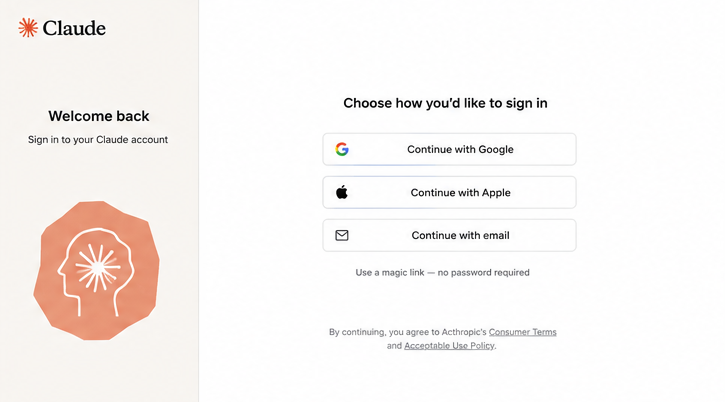
What is genuinely fast about Claude’s version of this: there’s no password to create, remember, or reset. You sign in with a Google account, an Apple ID, or a one-time “magic link” sent to your email, and that link logs you in without ever asking you to type a password.
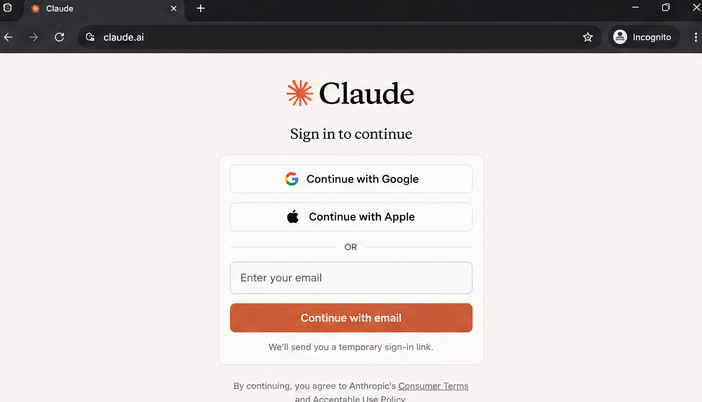
In practice, signing in with an existing Google account takes a few seconds. Click and confirm; you’re in. The email magic-link option takes a bit longer, since you have to wait for the message to arrive and click through from your inbox, and if you’re verifying on a different device than the one you signed up on, you’ll get a short code to enter instead of a direct link. Either way, it’s still account creation. It’s just a quick version of it, with none of the usual signup friction like choosing a password or filling out a profile.
What Signing Up Actually Takes
If privacy is the reason you’ve been avoiding this, it’s worth knowing exactly what Anthropic asks for, because it’s less than most platforms require. To open a free account, you need a verified email address (or a Google or Apple account to sign in with) and acceptance of the terms of service. You do not need a phone number, a credit card, your real name, or a billing address unless you upgrade to a paid plan. A phone number can be added later for account recovery, but it isn’t required to get started.
The free plan itself does not require a credit card and does not expire, so once you’re signed in, there’s no countdown forcing you to pay. The trade-off is usage limits: Anthropic does not publish exact message caps, and the company has said the number of messages available varies with overall demand rather than resetting on a fixed daily schedule. In other words, how many free shifts you can do depends on how busy Claude’s servers are at the time, not a flat number you can plan around.
What About Third-Party Platforms Like Poe or FlowGPT?
This is where a lot of “no login” guides get sloppy, including an earlier draft of this one. The pitch is always the same: skip Anthropic’s signup, get Claude through a side door instead. In practice, every side door has its own lock. Here’s the corrected picture for the platforms people ask about most.
Poe (by Quora)
Poe requires its own account before you can chat with any bot, Claude included. It is not a login-free front door to Claude. It’s a separate sign-up that then gives you metered access to Claude alongside other models through a points or message-allowance system. Free-tier users get a limited daily allowance, and which specific Claude model you can reach without paying has shifted over time as Poe has changed its plans and pricing, so I’m not going to pin a number here that will be outdated in a month.
Where Poe does add something genuinely useful is comparison: one account lets you run the same prompt past Claude, GPT, and Gemini side by side, which is handy if you’re choosing between providers rather than committed to one. But that convenience comes from consolidating several signups into one, not from avoiding signup altogether. And the version of Claude you reach for free is rarely the current flagship model.
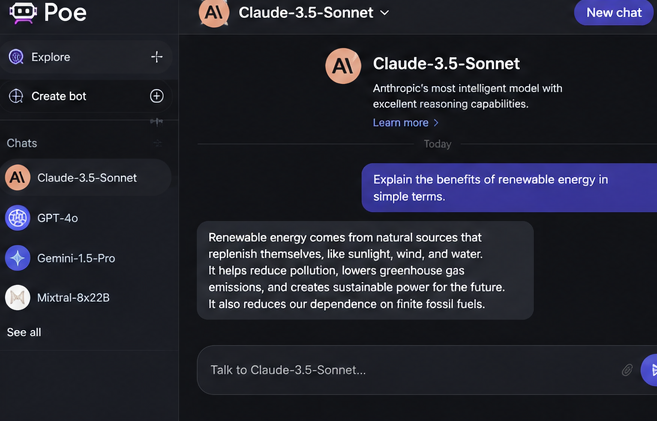
Worth knowing if you’re choosing between official Claude and Poe for regular use: Anthropic’s own free tier generally gives you a more current, more capable model than what most aggregators expose for free, plus features like file uploads and saved conversation history that free third-party tiers usually don’t match.
FlowGPT
Same story, with an added reliability problem. FlowGPT requires an account, and Claude access through it has been inconsistent in my testing: available one week, gone the next, with no guarantee you’re even talking to the model the page claims to offer. The platform is built around prompt sharing and discovery rather than sustained AI access, so treating it as a Claude alternative misunderstands what it’s for. I would not rely on it for anything you need to work reliably, and I’d be skeptical of any specific model name a FlowGPT bot claims to be running.
HuggingFace Spaces
Community-built “Claude” demos turn up on HuggingFace from time to time, but most of what I’ve found there is actually an open-source model like Llama, Mistral, and similar ones wearing a Claude-style interface, not genuine API-backed Claude. Treat anything here as a curiosity for experimenting with AI concepts generally, not a real Claude session. Where a Space does use the genuine Anthropic API, expect it to get rate-limited or taken down quickly, since the person who built it is usually paying for API access out of their own pocket and has no incentive to absorb unlimited free traffic indefinitely.
“Free Claude API” Proxy Sites
I’d actively avoid these. Sites promising free, keyless access to the Claude API are either reselling access bought with someone else’s API key or are scams. Sometimes a stolen one or collecting whatever you type in for unclear purposes, with no security guarantees and no accountability if something goes wrong. There’s no upside here that official free access doesn’t already cover, and the downside, handing your prompts or data to an unaccountable third party, isn’t worth it for the minor convenience of skipping a thirty-second signup.
Browser and Search Integrations (The Closest Thing to “No Login”)
A few mainstream products route some of your queries to a Claude model behind the scenes without making you create a Claude account specifically. Brave’s Leo assistant and DuckDuckGo’s AI chat are the two best-known examples, and both have offered a Claude Haiku option without a separate sign-up for that specific feature.
I’m flagging this rather than presenting it as settled fact: exact model availability and usage limits on these integrations change often and aren’t something Anthropic itself publishes or guarantees, since Anthropic isn’t the one operating the integration. I’d verify current details directly on Brave’s or DuckDuckGo’s own pages before relying on either for anything important, rather than trusting a third-party blog’s snapshot of what was true on the day it was written.
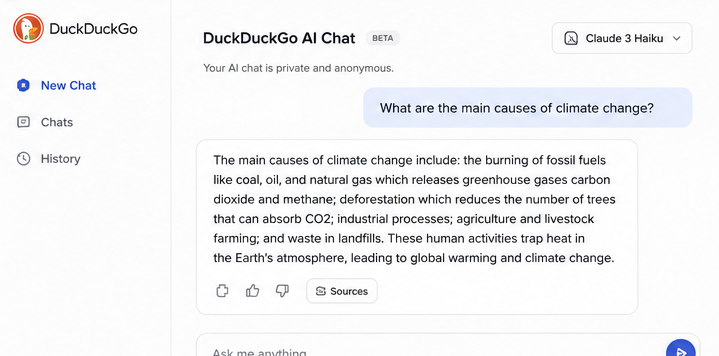
What I can say with more confidence is the broader pattern, which holds across most of these integrations: they’re reduced-friction routes into a smaller, faster Claude model, not full access to Claude’s current flagship capabilities. Document uploads, longer context windows, and the most capable model tier remain behind Anthropic’s own account system, whichever browser or search tool you’re using to get there.
Why So Many Guides Get This Wrong
It’s worth pausing on why “use Claude without login” results are so cluttered with bad information because it explains why I’m rewriting this piece rather than just patching the FAQ. A search for this phrase turns up a lot of content written to rank for the query first and answer it second, pages that list aggregator sites as “no login required” because the aggregator’s homepage is reachable without a click-through wall, without checking whether sending an actual message still requires creating an account once you get there. Some of it reads like it was produced to hit a word count rather than verified against the platforms it describes.
That’s a trap worth naming for content, as this site publishes too. The fix isn’t to write a longer version of the same workaround list; it’s to lead with the real answer, cite it to something checkable, and only include a number or a claim if there’s a primary source behind it. Where I couldn’t verify something here, I’ve said so directly instead of smoothing it over.
My Take
If your goal is a genuine Claude conversation long context, the current model, and file uploads, sign up for the free tier directly at claude.ai. It takes under a minute with Google sign-in, costs nothing, and does not expire. Third-party platforms have a real use case (quickly comparing several AI models side by side), but they are not a faster or more private path to the same Claude experience.
FAQs
1. Can I use Claude AI without creating any account?
No. Every working method — official or third-party — requires you to sign up for something. What varies is how fast and how minimal that sign-up is. Anthropic’s own login takes seconds with a Google account.
2. Do Poe or FlowGPT let me skip login entirely?
No. Both require their own account before you can send a message to any model, Claude included. Earlier versions of this article said otherwise — that was a mistake, and it directly contradicted the rest of the piece. Corrected here.
3. Is the free official Claude tier as good as third-party access?
For most everyday use, yes, and generally better. The official free tier runs on a more current model than what aggregators typically expose for free, and it includes features like file uploads and conversation history that most third-party free tiers don’t offer.
4. Is it safe to use Claude through a third-party platform?
Treat any third-party platform as a separate data steward from Anthropic. Avoid pasting sensitive personal or business information into a service whose privacy practices you haven’t checked, and skip proxy sites that claim to offer the Claude API for free without any account at all.
5. Does Claude save my conversations?
On claude.ai, yes — conversation history is tied to your account and persists across sessions and devices. On most third-party free tiers, history handling varies by platform; check that platform’s own privacy policy rather than assuming it matches Anthropic’s.