Claude Code vs Claude Chat: Which Should You Use?
You paste a bug into Claude and copy the fix. You run it and hit a new error, so you paste again. After four rounds, you wonder if there is a better way. There is, and it is the main reason to learn Claude Code.
This guide compares Claude Code vs Claude Chat in plain terms. You will see what each tool does and where each one wins. You will also get a simple rule for picking the right tool in under a minute. The guide suits intermediate and professional users who already work with Claude daily.
What Is Claude Code?
Claude Code is an agentic coding tool by Anthropic. The word “agentic” means that the tool performs certain actions independently. It reads files, edits them, and executes commands. It receives a purpose from you and then fulfills that purpose by performing certain actions independently.
People usually begin using it in the terminal, but there are also other options available for using it, including editor extensions and a desktop application. You can find the latest information regarding these options in the Anthropic documentation.
Inside a project, Claude Code can:
- Read your codebase and explain how the parts connect.
- Edit several files in one task.
- Run tests, linters, and build commands.
- Help with Git tasks, such as writing commit messages.
- Follow project rules that you store in a file called CLAUDE.md.
- Connect to outside tools through MCP, the Model Context Protocol. MCP is an open standard for linking AI tools to other apps.
By default, Claude Code asks permission before it changes files or runs commands. You can adjust those settings. Read the permissions documentation before you loosen them.
What Is Claude Chat?
Claude Chat is the conversation interface at claude.ai and in the mobile and desktop apps. Anthropic simply calls it Claude. Readers often say “Claude Chat” to separate it from Claude Code, so this article uses that name too.
You enter your message and receive an answer from Claude. You can upload files, paste text, and have a continuous dialogue. The functions include Projects, Artifacts, and web searches. This availability will depend on your subscription and settings.
Chat shines when judgment matters more than file access. Think of drafting, editing, research, brainstorming, analysis, and explaining code. Chat can write code too. It just cannot reach into your project folder by itself.
Some plans let Claude run code in a sandbox during a chat. That sandbox stays separate from your machine and your repository.
Claude Code vs Claude Chat Comparison
The table below shows the practical differences. Features change often, so verify details on Anthropic’s pages.
| Question | Claude Chat | Claude Code |
| Main job | Think, write, discuss | Change and check your files. |
| Where it works | Web, mobile, and desktop apps | Terminal, editors, and other supported surfaces |
| Sees your project | Only what you paste or upload | Reads files in your working folder |
| Runs commands and tests | No (a separate sandbox may exist). | Yes, with your permission. |
| Output you review | Text, snippets, documents | File changes you can inspect as diffs. |
| Long-term context | The conversation and projects | Your files and CLAUDE.md |
| Learning curve | Low | Moderate |
| Best for | Ideas, drafts, explanations | Bugs, refactors, repeated project tasks |
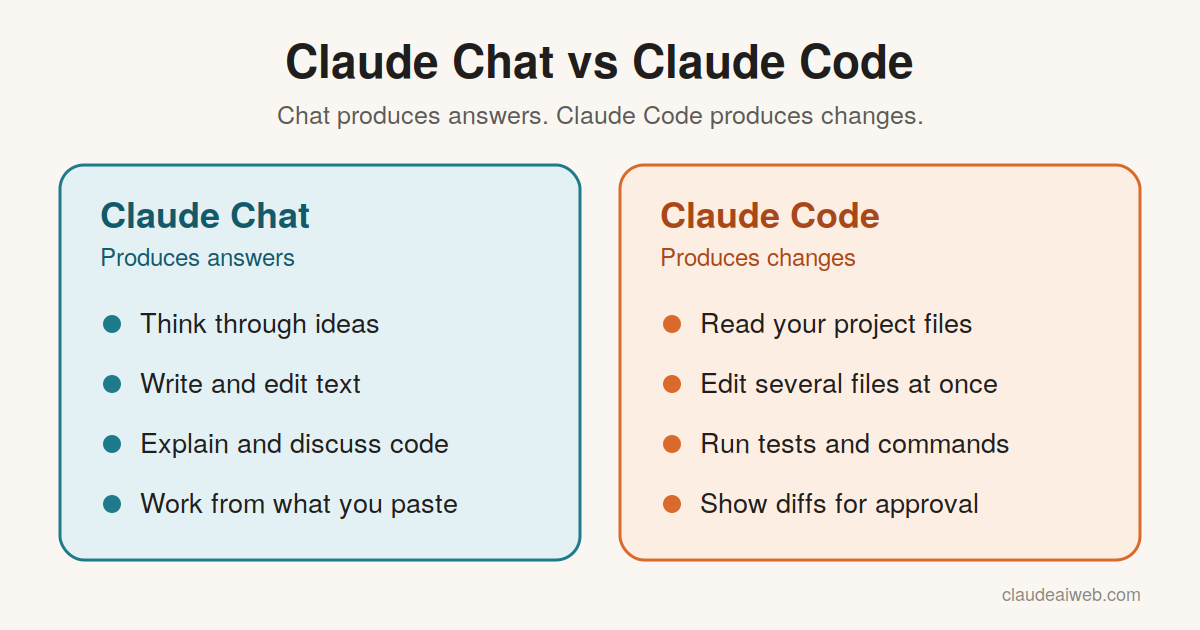
Notice the pattern. Chat produces answers. Claude Code produces changes.
The “Where Does the Evidence Live?” Rule
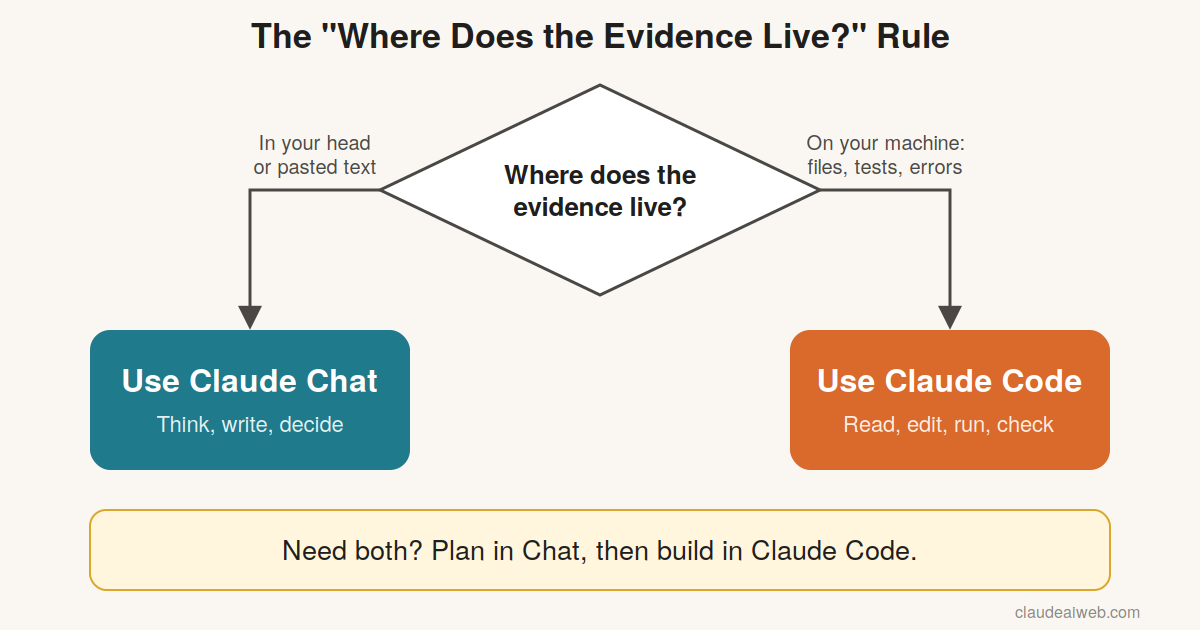
Most comparisons list features. A better question is this: where does the evidence live?
Evidence consists of facts that must be known before arriving at the answer. The evidence for the bug would be the test that failed, the trace of the error, and the surrounding files. When it comes to a cover letter, evidence includes your objectives and your voice.
Here is the rule: If the evidence lives on your machine, use Claude Code. If it lives in your head or in text you can paste, use Claude Chat.
This rule beats the common advice to choose by skill level. A beginner with a broken project often needs Claude Code. An expert sketching architecture often needs Chat. The tool should match the task, not the person.
Verification is the real cost
Writing code is cheap in both tools. Checking it is where your time goes.
In Chat, you verify by copying code, running it, and reporting back. Claude Code can run the tests itself and show you the result. That shortens the loop.
However, a diff across ten files takes longer to review than a ten-line snippet. Ask Claude Code for small, scoped changes. Small changes keep your review honest.
Context that outlives the conversation
Long chats drift. Early instructions fade, and you end up repeating yourself. A CLAUDE.md file in your project does not drift. It holds your rules, commands, and conventions, and every session can start from it.
Treat CLAUDE.md as a brief that outlives any single conversation. Chat has its own answer to this problem, which is Projects. Both tools work better when you write down your standards once.
Claude Code is not only for programmers
Claude Code operates on a directory of files. But the files may well be code, and yet they can also be markdown files, text files, or data files. If the files are in a directory, this program can interpret and manipulate them.
Nevertheless, beware of confusing the name with its abilities. But remember to be realistic about it. The less you deal with the terminal, the easier it becomes for you.
Practical Examples With Sample Prompts
These examples illustrate how each technology works in practice. The results differ depending on the particular project and technology.
Example 1: Debugging a failing test
For Chat, you provide your own evidence.
This is the error message and the faulty function. Describe the problem in easy-to-understand language. Present a solution.
You will receive an explanation and some code. You then have to implement it and test it.
In Claude Code, the tool gathers its own evidence.
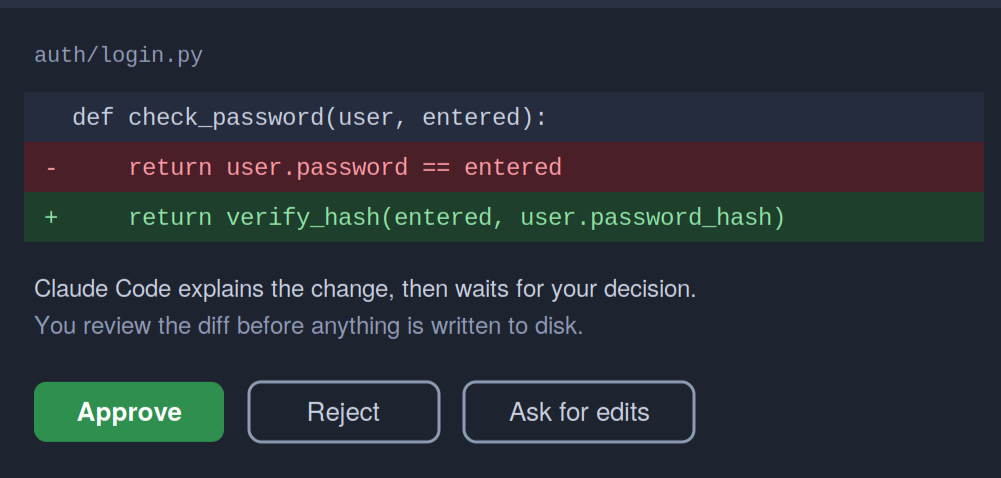
There is an issue with login test case in the main branch. Conduct tests, find out the issue and come up with a solution. Show me the difference before making any changes.
Expect Claude Code to run the tests and read the related files. It should then describe a change for your approval.
Example 2: Working with a folder of notes
Look through each file in Markdown format in this directory. Note those references to the 2026 budget. After that, write a one-page summary.md.
This task needs file access, so Claude Code fits. Chat would require you to paste every note.
Example 3: Plan in Chat, build in Claude Code
Start in Chat, where thinking is cheap.
Please assist me in developing a specification for a CSV export functionality. Edge cases and acceptance criteria should be included. A one-page limit is expected.
Then move the spec into Claude Code.
Implement the spec below. Start with a short plan. Please consult me prior to adding any new dependencies.
This transition process makes the best use of all tools involved. Chat fine-tunes the message. Claude Code executes it in your files.
Tips and Common Mistakes
Tips that work in both tools
- Stating the goal and the desired end point. “Fix that bug and get those tests to pass” is better than “take a look at this.”
- Assigning one task at a time. Smaller tasks result in smaller and verifiable accomplishments.
- Always request the action plan before assigning a major modification.
- Tell Claude what not to do, such as adding dependencies or changing the coding style.
Tips for Claude Code
- Control versions. Commit before embarking on the task to roll back.
- Commands and conventions should be written in CLAUDE.md.
- Check the diff. Never approve anything without reading it.
- Be strict with permissions until you are sure about the process.
Common mistakes
- Using Claude Code for tiny questions. A one-off regex is faster in Chat.
- Using Chat for project-wide changes. You will spend your day copying and pasting.
- Giving vague goals. Vague prompts lead to wide, hard-to-review changes.
- Skipping the test run. Generated code can look right and still fail.
- Pasting secrets. Never share API keys or passwords in either tool.
Limitations to Keep in Mind
Each one makes errors. Claude can write code that appears right but is wrong and can misinterpret the project. It should always be reviewed and tested.
Claude Code adds its own trade-offs:
- It has a learning curve, particularly if you don’t use a terminal much.
- It affects many files, so approvals must be very careful to avoid confusion.
- It will eat up your plan’s allowance, so beware that long sessions might consume too much.
- Capabilities, supported surfaces, and limitations vary. For more information, visit Anthropic’s official documentation and pricing pages.
Chat has limits too. It cannot see your project unless you share it. Very large codebases will not fit in a single paste.
Conclusion
Claude Chat and Claude Code solve different problems. Chat helps you think, write, and decide. Claude Code works inside your files to change them and check the result.
Use the evidence rule. If the facts live on your machine, pick Claude Code. If they live in your head or in pasted text, pick Chat. When a task has both parts, plan in Chat and build in Claude Code.
Your next step is simple. Pick one small task from this week and run it in the tool that matches the rule.
This website is an independent fan site. It is not affiliated with, endorsed by, or sponsored by Anthropic. Claude is a trademark of Anthropic.
FAQs
Is Claude Code better than Claude Chat?
Neither is always the better choice. Claude Code works best when the job at hand is based on your files, tests, and commands. Claude Chat works best for writing and planning, as well as thinking without constraints. Many people use both within a single process, so think of them as teammates.
Do I need to know how to code to use Claude Code?
While no expertise is required, some comfort is certainly useful. Terminal usage and diff reading should be within your reach. If either or both are foreign to you, begin your session in Chat mode. If you wish to use Claude to work with files, move to Claude Code mode.
Can Claude Chat write code?
Yes. Claude Chat is capable of writing, explaining, and debugging code. Claude Chat uses the information you provide in text form. Claude Chat does not access any of the folders in your project or execute any commands on your computer. Some paid plans allow you to use a sandbox to execute code in the chat.
Does Claude Code cost extra?
Access and limits depend on your plan and how you connect. Anthropic changes plans and usage rules over time. Check the official pricing page and the Claude Code documentation for the latest details before you decide.
Is Claude Code safe to run on my project?
It asks for permission by default, which helps. Still, use version control and review every diff. Keep secrets out of prompts and files you share. Start with a test project if you feel unsure.