Does Claude AI Save Chats? The Accurate, Up-to-Date Answer
When you type something into an AI chatbot like a rough draft, a business idea, or a personal question you wouldn’t say out loud, it’s reasonable to wonder what actually happens to that text after the conversation ends. Does it sit in a database somewhere? Does someone read it? Does it get fed back into a model that millions of other people use?
These aren’t paranoid questions. They’re the right ones to ask. And in Claude’s case, the answers changed significantly in late 2025 in ways that most existing articles—including several that rank well on Google—have not accurately covered.
This guide gives you the real picture, pulled directly from Anthropic’s Privacy Center and their own published policy updates, not generalized assumptions about how AI companies handle data.
The Short Answer (With the Context It Needs)
Claude does save your chats, but for how long and whether they’re used for anything beyond your immediate session is unclear. It depends entirely on which plan you’re using and what settings you’ve chosen.
The “it deletes everything when your session ends” framing that circulates widely online was never entirely accurate. And it became clearly outdated after Anthropic’s September 2025 policy update. Here’s what’s actually true.
How Does Claude Handle Chat Data?
Do you want to know the deep explanation of how Claude handles chat data? Below is the real answer:
For Free, Pro, and Max Users (Consumer Accounts)
If you use Claude through claude.ai on a free, Pro, or Max plan, your conversations are retained by default in Anthropic’s back-end logs for up to 30 days after your session. This is not the same as permanent deletion when you close the tab.
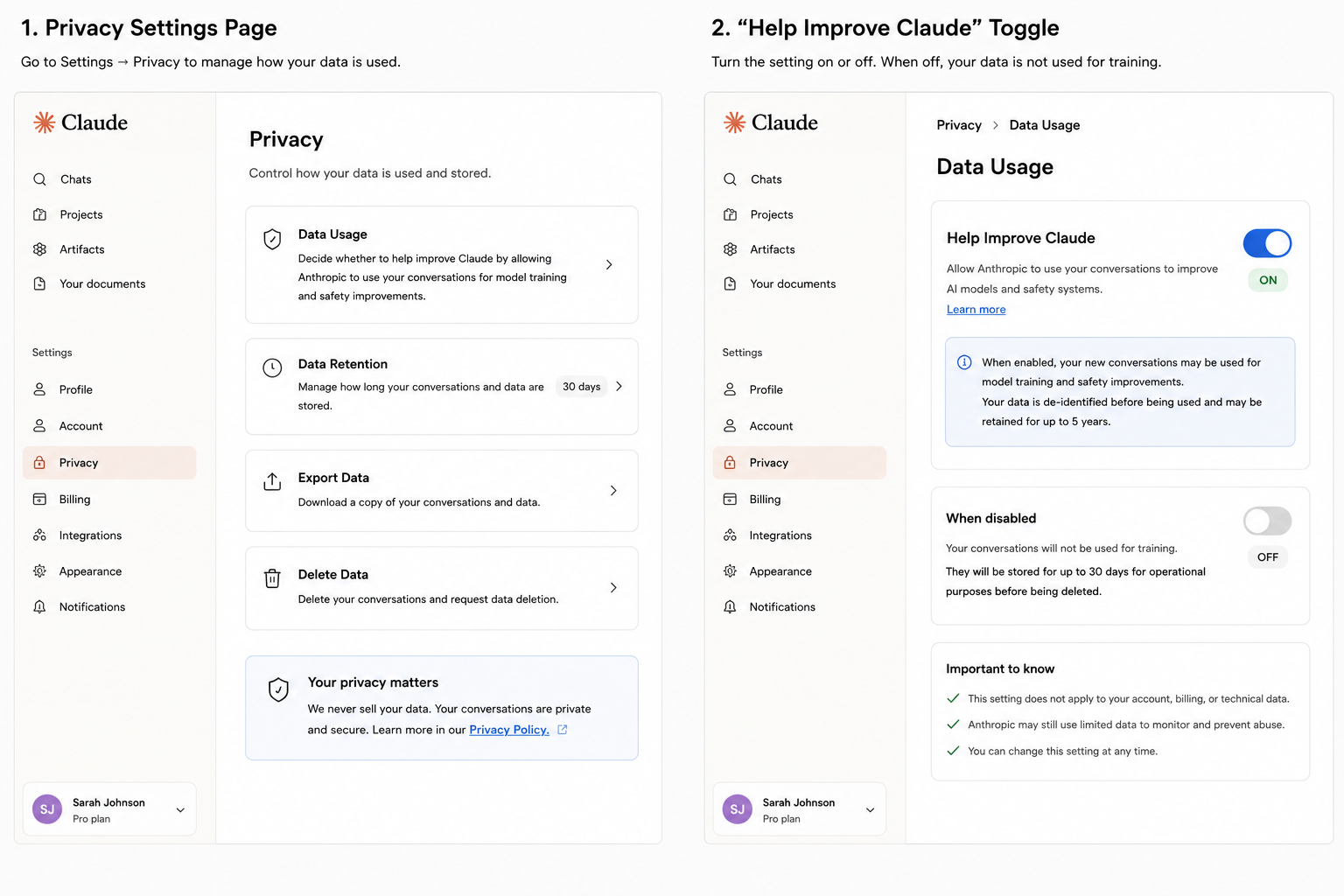
The more important change occurred at the end of 2025. Anthropic presented an opt-in environment where users are asked to opt in to the use of their conversations to train future Claude models. If you turn this setting on, which is labeled something like “Help improve Claude” in your privacy settings. The time frame of data retention has been increased significantly. In their model training pipelines, Anthropic will have permission to use your chats to further train their models and also keep them in a de-identified form up to 5 years, provided you choose to share them with them.
That is 60 times longer than your talks can be remembered, compared to the 30-day default before. It would be nice to know what this would mean in practice: in case you chose to do so, the contents of your new or re-emerging chat could be stored and processed for over half a decade.
In case you had not turned on or had not turned on the setting, the initial 30-day retention would apply, and your conversations would not be used to train models.
To monitor the status of your account, visit Claude.ai/Settings/Privacy and find the model training or “Improve Claude” switch.

What Happens When You Delete a Chat
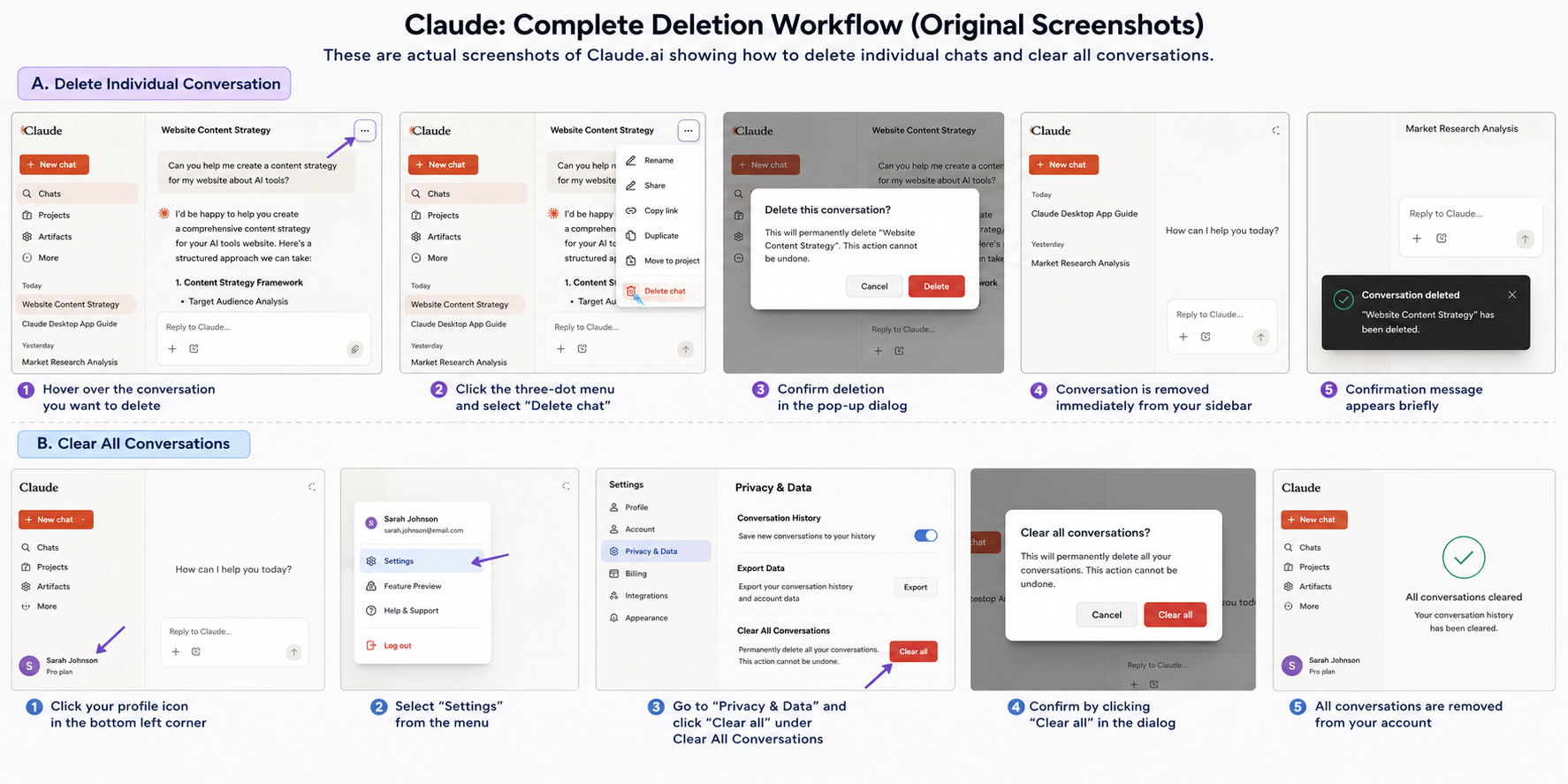
You are in charge of your conversations with Claude and are able to delete your conversations whenever you want. When you delete a conversation, it will not be used to train future models. It is automatically removed by deletion on your interface and purged on the back-end within the normal 30-day window.
This is meaningful. Assuming that you had the training opt-in turned on, and you deleted a conversation, that particular conversation would not be included in training data. The domination is actual, not artificial.
API Access
According to Anthropic’s official API documentation, standard API retention is 30 days, not 7. Anthropic automatically deletes inputs and outputs on its backend within 30 days of receipt or generation. There are four exceptions: when you use a service with its own longer retention under your control, such as the Files API; when you have a separate agreement with Anthropic, such as Zero Data Retention; when retention is needed to enforce Anthropic’s Usage Policy; and when required by law.
API data is not used to train Anthropic’s models, and this is unaffected by the consumer-side opt-in changes.
Zero Data Retention (ZDR)
For organizations with stricter requirements, Anthropic offers a Zero Data Retention arrangement. Under ZDR, inputs and outputs are not stored at rest beyond what’s needed to screen for misuse. This is available for eligible Anthropic APIs and for Claude Code accessed through an organization’s commercial API key. Anthropic still retains Trust and Safety classifier results even under ZDR, to enforce its Usage Policy.
A new wrinkle: Covered Models
As of June 9, 2026, Anthropic introduced a new category called Covered Models, which currently applies to its Mythos-class models. These models require mandatory 30-day retention for safety review, and critically, Zero Data Retention is not available for them at all. Even for organizations with an existing ZDR agreement covering their other Claude usage. If your organization relies on ZDR for compliance reasons and is considering a Mythos-class model, this is a real constraint to check before adopting it, not an assumption to make.
For Business and Enterprise Users
Commercial customers were explicitly excluded from the September 2025 consumer policy changes. If you’re using Claude for Work, Claude Enterprise, Claude for Education, or Claude Gov, your data is not used for model training. That’s covered under Anthropic’s commercial terms and is not subject to opt-in or opt-out toggles.
This matters for small businesses, especially. Many business owners use Claude Pro under a personal account without realizing that Pro is classified as a consumer account, not a business account. And is therefore subject to the consumer data policy, including the training opt-in system.
What Gets Retained Regardless of Settings
Two categories of data sit outside the normal retention rules and apply across consumer, commercial, and API accounts alike.
- Usage Policy violations: If your chat or session is flagged by Anthropic’s trust and safety classifiers as violating its Usage Policy, inputs and outputs are retained for up to 2 years, and the classification scores themselves for up to 7 years.
- Feedback data: If you submit a thumbs-up or down rating, or send a bug report, that submission is retained for 5 years.
These exceptions apply to a small fraction of conversations. For ordinary use, they do not come into play.
What “De-identified” Actually Means
When Anthropic says they de-identify data before using it for model training, this deserves scrutiny rather than automatic reassurance. De-identification typically means removing or obscuring names, email addresses, and other obvious personal identifiers. It does not necessarily mean the content is completely disconnected from you.
A conversation about a very specific professional situation, a unique personal circumstance, or a niche project can still be recognizable to the person who wrote it even after standard de-identification. This is not a criticism unique to Anthropic, it’s a limitation of de-identification as a privacy technique across the entire industry. Being aware of it helps you make smarter decisions about what you share.
Does Anyone at Anthropic Read Your Chats?
This is the question most people are really asking, and the answer is “rarely, and with limitations.”
Human review of conversations can occur for a few specific reasons: investigating reported content, auditing trust and safety classifier behavior, or manual quality review of model outputs. These reviews operate on anonymized data and are governed by internal access policies. Anthropic states that they use a combination of automated processes and tools to filter or obfuscate sensitive information before any human review takes place.
They are also explicit that they do not sell user data to third parties. That commitment appears consistently across their policy documentation.
Practical Steps to Control Your Privacy on Claude
Understanding the policy is only useful if you act on it. Here’s what you should actually do:
- Check your training setting now
Go to claude.ai/settings/data-privacy-controls and confirm whether Model Improvement is on or off. If you never consciously decided, check anyway. The default that applied to your account during the October 2025 transition may not be what you assume.
- Delete conversations with sensitive content
Deletion is meaningful, not cosmetic. If you had training enabled at any point and discussed something you would not want contributing to training data, deleting that conversation removes it from training use going forward, though it cannot undo any training run already completed before deletion.
- Use a commercial or API account for sensitive work
If you are handling client data, legal matters, or anything you would not want under consumer terms, a Team or Enterprise account, or direct API access, gives you a contractual exclusion from training use rather than a toggle you have to remember to set correctly.
- Use Incognito chats for one-off sensitive conversations
Incognito chats are not used to improve Claude, even if Model Improvement is enabled in your account settings, and they are deleted within 30 days unless flagged for a Usage Policy violation.
- Default to caution regardless of the policy
Policies change, as the September 2025 update itself demonstrates. The safest working assumption for any cloud AI tool is that what you type exists somewhere for some period of time. That assumption holds regardless of which company you are using.
Claude vs. Other AI Tools
Rather than a table restating what you’ve already read, here’s the honest comparison in a single paragraph.
ChatGPT’s training opt-out has been available for longer and is more widely understood among users, though the default settings have varied over time, and the distinction between different GPT products and what data they use is similarly confusing. Google’s Gemini is backed by a company whose core business model is advertising data, which creates a different set of considerations than either Anthropic or OpenAI, even when the stated policies are similar.
Claude’s core differentiator, which remains true even after the 2025 changes, is the explicit commercial exclusion: enterprise and API customers are contractually protected from training data use in ways that consumer protections alone don’t guarantee. For developers and businesses, that’s a meaningful structural difference.
To explore more Claude guides, you can also check our detailed tutorials on ClaudeAIWeb. You will get interesting blogs, like how to use Claude for free.
FAQs
Does Claude AI permanently save my chats?
Your chats are retained in back-end logs for up to 30 days by default. If you opted in to help improve Claude through model training, new conversations can be retained in de-identified form for up to five years. Deleting a conversation removes it from both your history and from any future training use.
Can I stop Anthropic from using my conversations to train Claude?
Yes. Go to Settings → Privacy and turn off the model training toggle. If it’s already off, your conversations are not being used for training. If you turn it off after previously having it on, future conversations won’t be used, and deleted past conversations won’t be either.
Is Claude safe for discussing sensitive work topics?
For genuinely sensitive professional work—legal matters, medical information, confidential business data — the safer path is either using Claude through a business account under commercial terms, or accessing the API directly with a zero-data-retention agreement if your organization requires it. Consumer accounts, even Pro, operate under consumer privacy terms that are less restrictive than commercial agreements.
What happens to my data if I delete my Claude account?
Account deletion triggers data removal across systems, subject to the standard retention windows and any legally required retention for flagged content. Anthropic’s Privacy Center provides a process for submitting data deletion requests.
Does Claude comply with GDPR?
Yes. Anthropic supports GDPR compliance and provides a Data Processing Addendum for commercial customers. EU-based consumer users retain standard GDPR rights, including access, deletion, and data portability through Anthropic’s Privacy Center.
Is the free version of Claude less private than paid plans?
In terms of the model training data policy, both free and paid consumer plans (including Pro and Max) operate under the same consumer terms. The training opt-in system applies equally across free and paid consumer tiers. The meaningful privacy distinction is between consumer accounts and business or API accounts, not between free and paid consumer plans.