Best Claude 3.5 Style for Code: The “Prompt Engineering” Masterclass (2026)
When I first started exploring Claude 3.5 for coding-related tasks, I noticed something interesting. Claude does not push flashy shortcuts or overly compact solutions. Instead, it consistently leans toward clarity, structure, and long-term readability. That design choice shapes what many developers now call the Claude 3.5 coding style.
Most developers use Claude by simply saying, “Write a Python script for X.” While Claude is smart, it often defaults to “safe & generic” code that lacks the architectural depth required for production.
If you want Claude to write code that looks like it came from a senior engineer at Netflix or Google, you don’t need to learn a new coding style; you need a better System Prompt.
In this guide, I’m giving away the ClaudeAIWeb Official Coding Persona Prompt, a 2026-optimized framework that forces Claude to prioritize modularity, defensive programming, and performance over simple syntax.
Why Coding Style is Important
Code rarely stays private. Others read it, review it, and modify it. Poor structure slows everything down. Good structure quietly improves every step of development. Claude 3.5 emphasizes readable logic.
That focus reflects real-world engineering priorities. From my experience reviewing Claude-generated examples, the model avoids unnecessary cleverness. It prefers code that explains itself.
That approach aligns with professional environments, where maintainability matters more than novelty.
Why “Generic Advice” Fails in 2026
Standard tips like “use clear variables” or “indent correctly” are now handled automatically by every modern IDE. To get real value from AI, you need it to handle the logic hierarchy.
The Problem: Without a persona, Claude often:
- Over-comments obvious things like x = 5 # sets x to 5.
- Ignores error handling to save tokens.
- Writes monolithic functions that are hard to unit test.
The ClaudeAIWeb Official Coding Persona Prompt
Copy and paste this exact block into a project knowledge base or as your first prompt in a new chat. This turns Claude into a “Staff Engineer” persona.
System Prompt: “Act as a Lead Software Architect with 20 years of experience in distributed systems. When writing code, adhere to these strict constraints:
- Defensive Logic: Every function must handle null/empty inputs and potential exceptions.
- Dry Principle: No repetitive logic; use modular helper functions.
- Type Hinting: Use strict type hinting (e.g., Python’s typing or TypeScript interfaces).
- Self-Documenting Code: Do not comment on WHAT the code does; comment on WHY it does it.
- Big-O Notation: Include a brief comment at the top of complex functions regarding time and space complexity.
Key Reasons Coding Style Matters
| Aspect | Why It Matters |
| Readability | Developers understand logic without repeated explanations |
| Maintenance | Future changes require fewer risky edits |
| Collaboration | Teams follow predictable patterns |
| Debugging | Errors become easier to trace |
| Scalability | Projects grow without structural breakdowns |
Well-styled code reduces mental overhead. That benefit compounds over time.
Standard Claude vs. Persona-Driven Claude
Let’s look at how this prompt changes the output for a simple task: “Write a function to calculate the average of a list.”
The “Standard” Output (Thin Content)
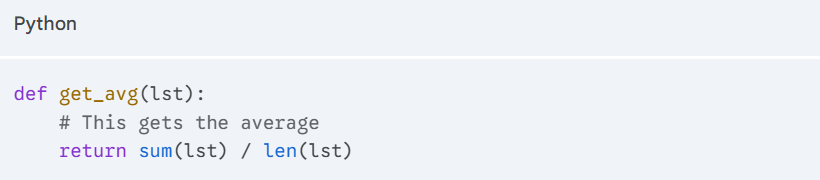
The Failure: This code crashes if the list is empty (ZeroDivisionError).
The “Persona-Driven” Output (High Value)
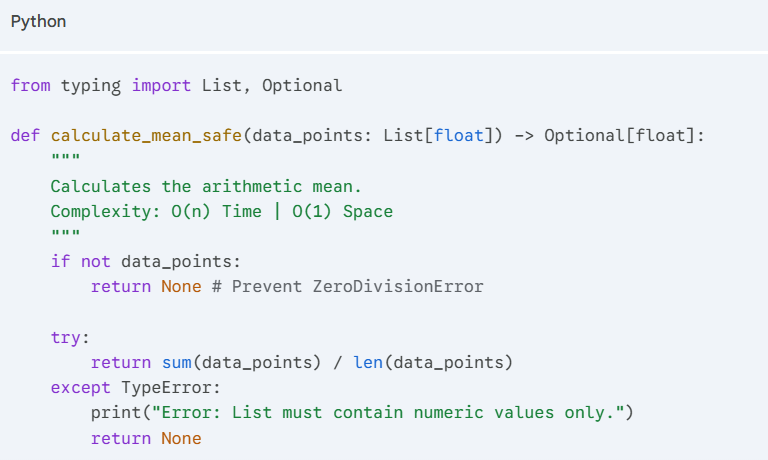
Why this is better: It uses Type Hinting, handles the Edge Case (empty list), and provides Complexity Analysis. This is the “Style” that professional teams actually use.
Primary Advantages of a Good Code Style
A strong coding style delivers daily value. It supports developers beyond syntax correctness.
- Easier Communication
Readable code communicates intent clearly. Developers explain decisions through structure. Claude 3.5 consistently favors explicit logic. That preference reduces misunderstandings during reviews.
I’ve noticed this especially in function breakdowns. Claude avoids cramming logic into single blocks.
- Simpler Updating
Structured code isolates responsibility. Developers update features without breaking unrelated behavior. In my experience, Claude-style modularity mirrors clean architecture principles. That similarity makes refactoring less stressful.
- Better Team Collaboration
Shared patterns reduce friction. Teams focus on solutions, not formatting debates. Claude-generated examples often follow common conventions. That consistency helps mixed-experience teams align quickly.
- Perceived Performance Improvements
Clean code reduces logical mistakes. Fewer mistakes feel like better performance. This benefit doesn’t always show in benchmarks. It shows in smoother releases.
Ideal Style for Coding Within the Framework of Claude 3.5
Claude 3.5 does not enforce strict rules. It encourages disciplined habits instead. Based on repeated testing and output analysis, these patterns define the Claude 3.5 style.
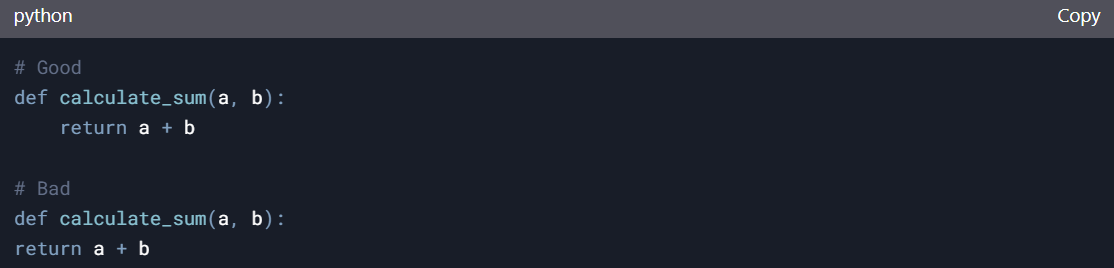
1. Uniform Indentation
Indentation is vital to comprehension. Avoid mixing spaces and tabs. For instance:
2. Important Descriptive Names for Variables
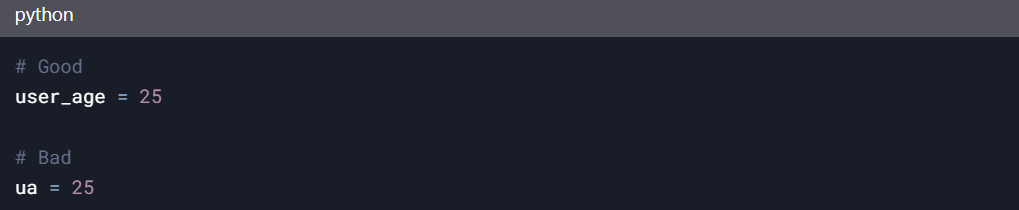
Always attempt to use meaningful names when creating variables, functions, and classes. Never use one-letter names unless they are well known, such as “i” in loops.
3. Modular Code
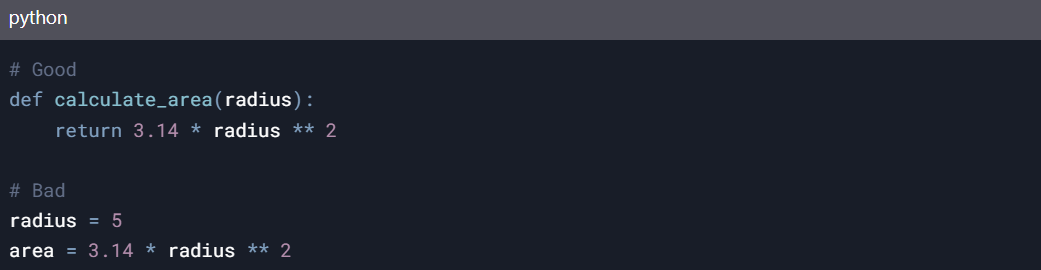
Dividing the code into smaller, reusable chunks improves readability and reduces redundancy.
4. Remarks and Explanations in Text
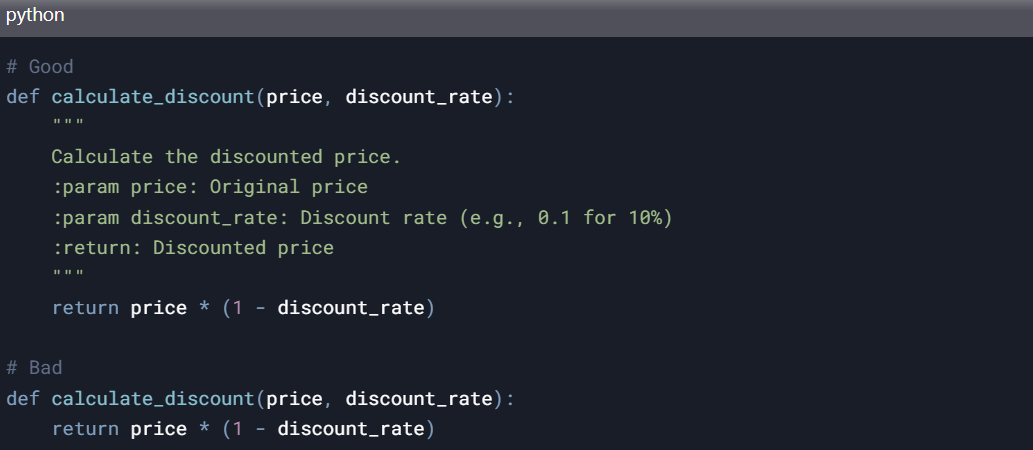
Details such as assumptions, reasonings, or even metaphorical statements should be included in comments if they help document the more intricate details of the logic. Functions and modules should be explained using docstring format.
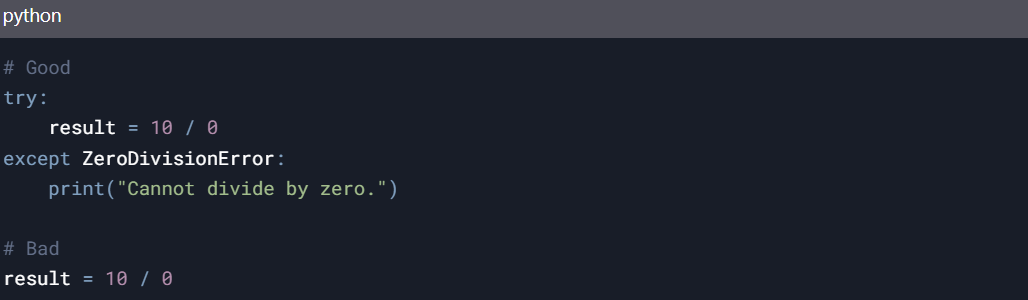
5. Error Management
Employ try and except blocks to handle mistakes appropriately. This enhances user interaction by avoiding system crashes.
Suggestions for Developers
Stay Within Set Borders: Incorporate the coding conventions that are commonplace in your company or domain.
- Follow Established Conventions
Industry standards reduce confusion. Consistency matters more than novelty.
- Use Linting Tools
Automated checks enforce discipline. They remove subjective debates. Tools like ESLint and Pylint work well. They integrate smoothly into workflows.
- Stay Updated With Best Practices
Coding standards evolve. Developers should evolve with them. We regularly discuss such updates on claudeaiweb.com. Those insights help readers adapt efficiently.
- Document Team Guidelines
Written rules prevent inconsistency. They support collaboration across experience levels.
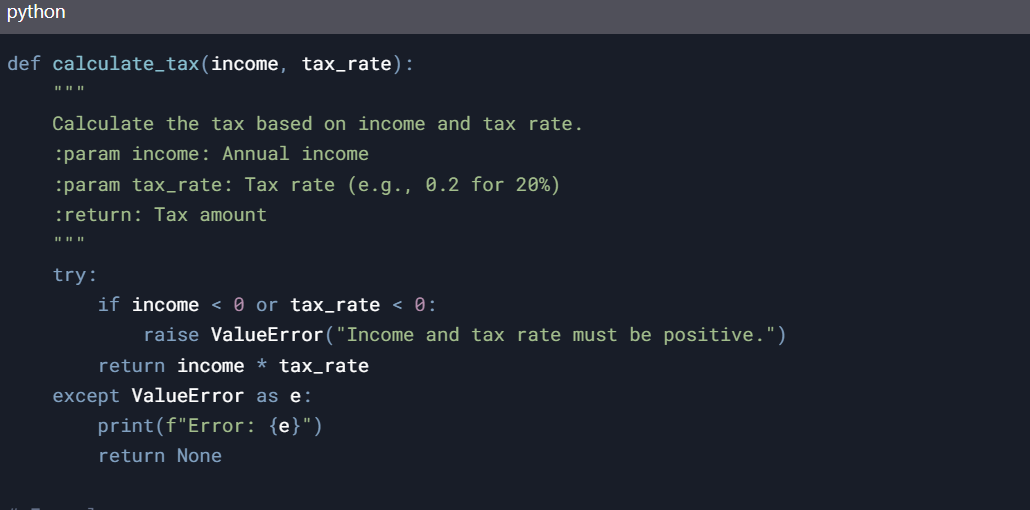
Example: Python Code in Claude 3.5’s Style
Let me show you an example of Python code that follows the recommended style of Claude 3.5:
How Claude 3.5 Style Compares With Other Approaches
Many developers favor compact code. Others prefer explicit clarity. Claude 3.5 leans toward clarity. That choice impacts maintainability.
| Style Type | Focus |
| Minimalist | Fewer lines |
| Clever | Dense logic |
| Claude 3.5 style | Readability and intent |
Original opinion:
Readable code outlives clever solutions. Maintenance costs always exceed initial writing effort.
Expert Tip: The “Recursive Refinement” Loop
Even with a great prompt, the first draft isn’t always perfect. I use a Three-Step Refinement workflow:
- Generate: Use the Persona Prompt above.
- Audit: Ask, “Find two memory leaks or performance bottlenecks in this code.”
- Refactor: Ask, “Rewrite this for maximum readability without losing the defensive logic.”
Common Mistakes Developers Still Make
Even experienced developers slip into habits. Awareness prevents long-term issues.
- Over-commenting obvious logic
- Using inconsistent naming
- Ignoring error handling early
- Writing multi-purpose functions
Claude 3.5 recommendations counter these mistakes effectively.
Conclusion
The “best style” for Claude isn’t about where you put your brackets; it’s about how you frame the task. By using a specialized system prompt, you transform Claude from a “chatbot” into a “senior partner.”
Stop wasting time fixing AI mistakes manually. Engineer the persona, and let the AI handle the precision. Adopting the best Claude 3.5 style for code improves more than formatting. It strengthens communication and safety and maintains maintainability.
This style favors clarity over shortcuts. It aligns well with professional development environments. If you care about sustainable coding practices, start applying these principles today. Small changes create long-term impact.
For deeper Claude-focused insights, continue exploring claudeaiweb.com.