Claude Team Plan: Complete Pricing Analysis for 2026
I started managing Claude subscriptions across two separate teams about eight months ago. One is a four-person content team using individual Pro accounts, the other a seven-person research group. I moved on to the Team plan after we kept duplicating work. That hands-on comparison is what this article is based on.
The Team plan is not simply Pro with more seats. It changes how your team accesses, shares, and governs AI work. Whether that change justifies the cost depends entirely on your collaboration patterns, and most pricing breakdowns skip that question entirely.
Below, I walk through verified current pricing, the real cost calculation, where the Team plan delivers value, and where it does not.
Current Claude Team Plan Pricing (Verified June 2026)
Anthropic currently offers two seat types within the Team plan, each with monthly and annual billing options. The minimum requirement is five seats, regardless of how many people you actually need.
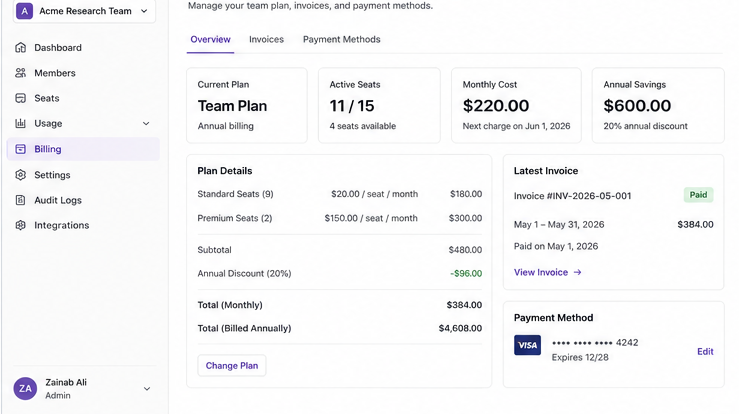
Standard seats: $25/seat/month billed monthly, or $20/seat/month on an annual commitment. These cover access to Claude.ai, shared projects, admin controls, and standard usage limits.
Premium seats: t $150 per seat monthly on either billing cycle, the Premium tier introduces direct Claude Code access alongside significantly higher usage limits. This tier is highly relevant if your team runs code generation, automated workflows, or API integrations as part of daily operations.
Annual billing saves 20% on Standard seats ($20 vs $25 per seat). Premium seats carry the same price whether you choose monthly or annual billing. I highly recommend confirming the current rates directly at claude.com/pricing before you commit to a plan.
Five-seat minimum: Even if only two or three people need access, you pay for five seats. A team of three on Standard monthly billing must pay $125 per month for the five-seat minimum, rather than $75 for three seats. You must build this structural floor into your cost estimate from the start.
What the Team Plan Actually Includes
Before comparing costs, it helps to understand what the Team plan adds beyond individual Pro access. These are the features I actually use across both teams I manage:
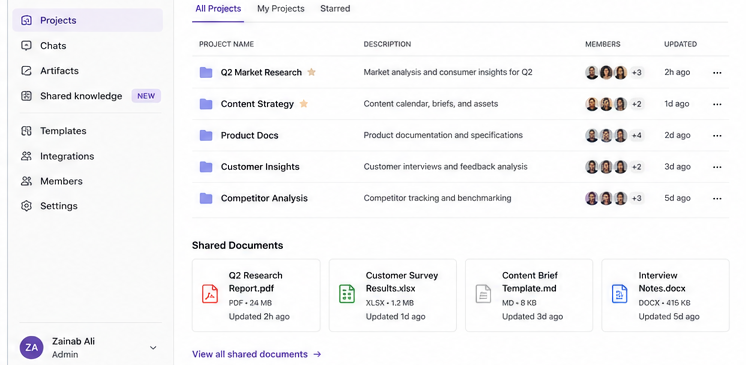
Shared Projects and Knowledge Bases
Team workspaces let members share uploaded documents, conversation context, and project files across the group. On my research team, this eliminated the pattern where three people independently uploaded the same 40-page report and asked Claude separate but nearly identical questions. Shared projects mean that work happens once, and everyone builds from it.
Admin Controls and Usage Oversight
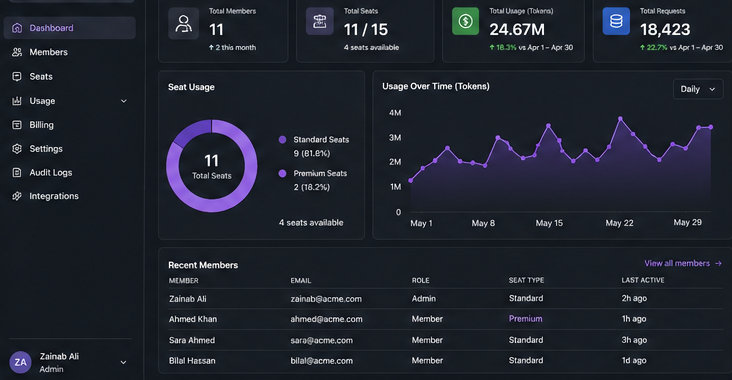
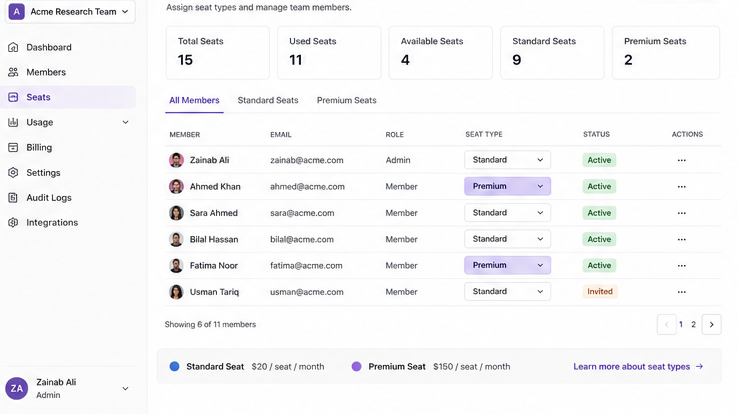
The admin dashboard shows which members are active, lets you assign or reassign seats, and handles billing centrally. This administrative oversight matters directly to teams with strict compliance or data governance requirements. Unlike individual subscriptions, this unified workspace lets you track exactly who uses Claude and audit their specific use cases.
Centralized Billing
One invoice replaces individual expense claims from multiple team members. For finance teams processing five or ten separate $20 monthly charges, this administrative simplification has real value even if it sounds minor.
Higher Usage Limits
Standard Team seats offer more usage per session than individual Pro, and Premium seats offer substantially more. Usage limits apply per person per week and reset on a fixed schedule. The exact figures are not published by Anthropic, but in practice, my content team has not hit limits on Standard seats during normal workweeks.
The Real Cost Comparison: Team vs. Individual Pro
Individual Claude Pro costs $20/month. The Team Standard seat costs $20 per month when you choose annual billing, matching the Pro tier price exactly. Alternatively, you can opt for monthly billing at a rate of $25 per month.
At first glance, annual Team billing appears cost-neutral versus individual Pro. But the five-seat minimum changes the math for small teams.
Scenario: Three-Person Team
Individual Pro: 3 × $20 = $60/month
Team Standard monthly: 5 seats minimum × $25 = $125/month
Team Standard annual: 5 seats minimum × $20 = $100/month
Even on annual billing, a three-person team pays $100 per month compared to $60 for individual Pro accounts. This means you pay a 67% premium solely to access the shared collaborative infrastructure. If those three people work largely independently, that premium is hard to justify.
In my content team, which has four writers, the shared project workspace saves us from redundant brief uploads and overlapping research requests. My rough estimate is that we each reclaim 30–45 minutes per week that previously went into duplicating context. Whether that justifies $40/month in extra cost depends on what your team’s time is worth, but for us, it does.
Scenario: Ten-Person Team
Individual Pro: 10 × $20 = $200/month
Team Standard annual: 10 × $20 = $200/month
Team Standard monthly: 10 × $25 = $250/month
At ten seats on annual billing, Team Standard costs the same per-seat as Pro. You pay nothing extra for centralized billing, admin controls, shared projects, and higher usage limits. At this scale, the Team plan becomes an obvious choice for any group that collaborates even occasionally.
Where the Team Plan Earns Its Cost
After eight months managing both plan types, I identified exactly where the Team plan delivers clear value. Conversely, I also mapped out the specific scenarios where the investment fails to yield a return.
It earns its cost when:
- Team members regularly share documents, reference the same sources, or build on each other’s Claude outputs. Shared workspaces prevent duplicated effort that individual accounts cannot eliminate.
- Your organization requires centralized oversight to monitor exactly how your team uses Claude. This unified control panel allows you to enforce data governance, maintain compliance, and actively manage team usage patterns.
- Your team is growing and will add members over the next six to twelve months. Setting up the infrastructure once scales cleanly; migrating from individual accounts mid-growth is disruptive.
- Multiple people work on the same project type and would benefit from shared prompt templates. My research team maintains a shared library of analysis prompts that newer members use immediately instead of building their own from scratch.
It does not earn its cost when:
- Team members work independently on unrelated projects. Paying for shared infrastructure that nobody uses is a waste.
- Fewer than five people need access, and an individual Pro covers their actual usage. The minimum seat requirement makes small-team economics unfavorable.
- Usage is occasional or project-specific. A three-month project does not justify an annual billing commitment for five seats.
- Two or three members are heavy users, and the rest rarely log in. Individual Pro for the heavy users and free-tier access for casual users likely costs less.
Enterprise Plans
The Team plan supports up to 150 seats. Organizations that exceed that, or that require capabilities the Team plan does not offer, move to Enterprise. Enterprise pricing is custom and negotiated directly with Anthropic’s sales team.
Based on what Anthropic publishes, Enterprise adds SSO integration with identity providers like Okta and Azure AD, guaranteed support response times, custom data retention controls, and advanced audit logging. Regulated industries—including healthcare, financial services, and government—typically require these specific security features. Organizations operating in these sectors must implement these guardrails regardless of the final software cost. If your organization has compliance mandates around AI tool usage, the Team plan likely does not meet them, and Enterprise is worth the conversation.
Contact Anthropic’s sales team at claude.com/contact-sales for Enterprise pricing. Anthropic does not publish Enterprise rates publicly.

Implementation
If you decide the Team plan fits your situation, three things determine whether you get value from it:
Curate your shared project structure before you invite everyone
I made the mistake of letting my seven-person team add documents and start projects organically. Within six weeks, the shared workspace was cluttered with overlapping project names and redundant uploads. Designate one person to set up the folder structure and naming conventions before the team migrates. It sounds like admin busywork, but it determines whether shared resources actually get used.
Assign seat types deliberately
Not everyone needs a Premium seat at $150/month. Admin users, reviewers, and anyone who only accesses Claude through the web interface can use Standard seats at $20–$25/month. Map out who actually needs Claude Code or elevated usage limits before you assign seats. On a team of ten, the difference between all Standard and all Premium seats is $1,000/month.
Run a pilot before full migration
Start with three to five members who already collaborate closely. Give them 30 days in the Team workspace and observe whether the shared features change their workflow in measurable ways. If it does not improve collaboration for your most collaborative team members, it will not improve it for anyone else. This saves you from committing to an annual plan for ten seats before you know whether the infrastructure adds value for your specific team.
Who Should Buy Claude Team?
| Team Type | Recommendation |
| 1-4 users | Stay on Pro |
| 5-9 users | Depends on collaboration |
| 10+ users | Team plan usually wins |
| Enterprise | Evaluate Enterprise plan |
Bottom Line
The Claude Team plan makes clear financial sense when your team actively collaborates on projects. By sharing documents and building on each other’s work, your organization maximizes the return on investment from centralized management. At ten or more seats on annual billing, it matches individual Pro pricing per seat while adding meaningful infrastructure. At five or fewer seats, you pay a premium that only makes sense if the collaborative features address a real problem in your workflow.
The plan that costs more on paper is not always the wrong choice. The plan that does not match how your team works is always wrong.
You must verify current pricing at claude.com/pricing and review the official billing details at support.claude.com before you make a final commitment. Anthropic updates these rates periodically, meaning the figures in this article reflect only what I personally confirmed in June 2026.
For more insights on AI collaboration, check our blog on Claude AI features
FAQs
What is the minimum team size for the Claude Team plan?
Five seats is the minimum, regardless of how many people you actually need. If you have three users, you still pay for five seats. The plan supports up to 150 seats; organizations that need more should contact Anthropic about Enterprise.
What is the difference between Standard and Premium seats?
Standard seats ($20–$25/seat/month) provide access to Claude.ai, shared projects, and standard usage limits. Premium seats ($150/seat/month) add Claude Code access and significantly higher usage capacity. Only team members who use Claude Code or need elevated limits require Premium seats.
Does the Team plan include API access?
The Claude API is a separate product from the Team plan workspace subscription. If your team needs API access to build integrations or run automated workflows, that is billed independently through the Anthropic API console. The Team plan itself provides web-based Claude.ai access and Claude Code (on Premium seats), not standalone API credentials.
Can I mix Standard and Premium seats?
Yes. You can assign different seat types to different team members. This is how you manage cost effectively—give Premium seats to developers or heavy Claude Code users and Standard seats to everyone else.
What happens if I remove a team member mid-billing cycle?
On annual plans, removing a member frees their seat for reassignment and applies a prorated credit to your account. On monthly plans, removed members’ seats become available for other team members at the next billing cycle. You are not refunded for partial months on monthly billing.
When should I consider Enterprise instead of Team?
Consider Enterprise if your organization exceeds 150 users, requires SSO integration, needs guaranteed support response times, or operates in a regulated industry with compliance requirements around data retention and audit logging. Contact Anthropic’s sales team at claude.com/contact-sales for a custom quote.