Claude AI Capabilities in 2026: An Honest Breakdown
There is no shortage of articles that tell you Claude can “write emails, summarize documents, and help with coding.” That answer is technically true and completely useless. It is like describing a car as something that “moves you from one place to another.” Accurate. Meaningless.
After spending a significant amount of time using Claude across real work, content research, document analysis, coding assistance, and strategic thinking. I don’t want to offer you a simple feature checklist here. Instead, I would like to share what Claude really excels at doing, what it fails to do quietly, and how to incorporate it into your daily routine without adding yet another browser tab.
First, What Claude Actually Is
Claude is an advanced language model powered by artificial intelligence developed by Anthropic. It is an organization founded in 2021 by the creators of some OpenAI projects. One main thing about Anthropic is that it places great emphasis on AI safety and constitutional AI. This means that the model is influenced by certain principles during training.
Why does that matter practically? Because it changes how Claude behaves when you push it. Claude is not programmed to always satisfy the wishes of the user. It can even tell you that your request makes no sense. It can disagree with your logic, and it will never confirm something just because you believe it. This may seem slightly irritating to some users. For anyone doing serious analytical work, it is genuinely valuable.
As of mid-2026, the main models available are Claude Opus 4, Claude Sonnet 4, and Claude Haiku 4. Opus is the most capable and the slowest. Haiku is fast and lightweight. Sonnet sits in the middle and handles the majority of real-world tasks well. You can access Claude through claude.ai, through the API, or through Claude Code for terminal-based development work.
What Claude Does Genuinely Well
1. Long Document Analysis
This is where Claude earns its reputation. The context window on current Claude models is large enough to ingest entire research papers, long contracts, or substantial codebases in a single session.
Here is what that looks like in practice. I uploaded a 38-page vendor contract and asked Claude to identify every clause that limited liability for the vendor while expanding it for the client. It returned a clean, bulleted list organized by section number. The analysis took about 40 seconds. A junior paralegal doing the same task manually would take two to three hours and probably miss something buried in the definitions section.
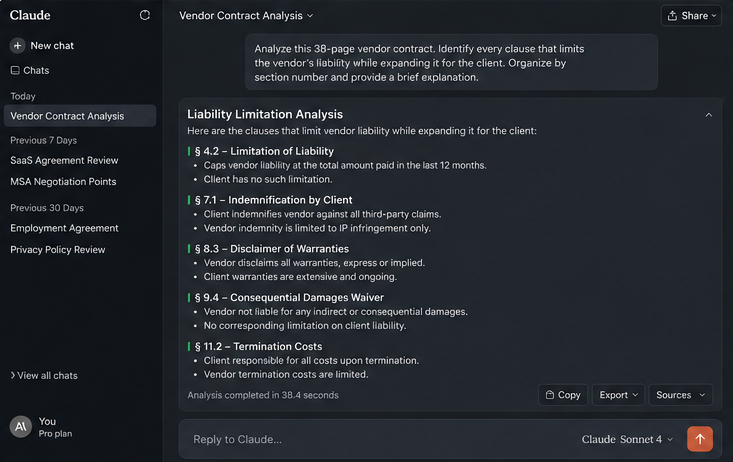
But here is the catch, and it matters: Claude does not always tell you when it is uncertain. If there really are two plausible interpretations for a particular clause, then Claude would most likely make its mind up about one and state it decisively. You need to learn to ask yourself, “What could be the alternative interpretations to this clause?” That second question consistently surfaces nuance that the first answer smoothed over.
The lesson is not that Claude is unreliable at document analysis. It is that its confidence does not always map to actual certainty, and your job as a human is to probe the edges.
2. Structured Thinking and Argumentation
One of the most underused things you can do with Claude is ask it to argue against your own position. Not “what are the pros and cons” that gives you a balanced list that says nothing. Ask it specifically: “Steelman the opposing argument. Give me the strongest possible case against what I just proposed.”
I tested this with a content strategy decision I was working through. I had a hypothesis about long-form content performing better than short-form in a specific niche. I asked Claude to build the strongest case against that hypothesis. It came back with three arguments I had not considered. One involving content consumption patterns on mobile that was genuinely useful and changed how I approached the format decision.
This is not magic. Claude is drawing on patterns in its training data. But the discipline of forcing an opposing argument through a structured prompt is something most people skip, and Claude executes it well.
3. Rewriting and Editing
Claude is a strong writer but an even better editor. The difference matters.
When you ask Claude to write something from scratch, the output is competent but often lacks a specific voice. It defaults to a kind of pleasant, clear, slightly generic register. If your goal is purely functional communication, an email, a product description, or a summary, that is fine. If you are trying to produce content with a distinct personality, you need to bring more of your own material into the prompt.
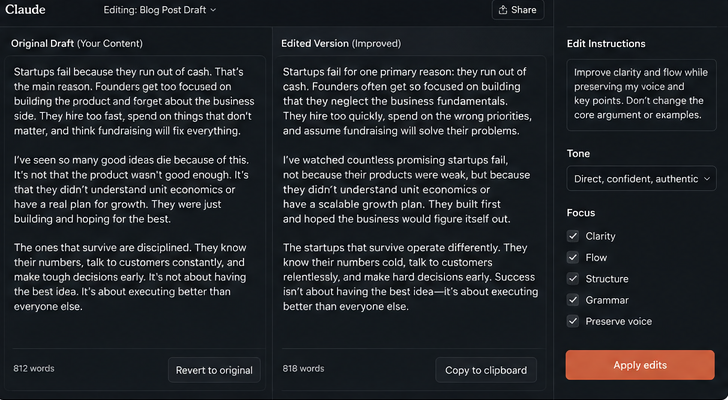
Where Claude genuinely shines is in taking rough material and restructuring it. Give it a messy first draft with your actual ideas in it and ask it to improve clarity and flow without changing the argument. The results are consistently good. It preserves the substance while cleaning the structure, which is exactly what editing is supposed to do.
I have also found it reliable for matching a specific tone when you give it examples. Paste three samples of writing you want to match and describe the target audience, and Claude will approximate that voice reasonably well. It is not perfect, but it is a workable starting point.

4. Coding
For non-developers, Claude removes the “I don’t know where to start” barrier. You can describe a task in plain English. Rename files based on their creation date, extract specific rows from a CSV, build a simple web scraper, and Claude will write working code with an explanation of how to run it.
The explanation part is important. Claude does not just hand you a script. It tells you which tool to install, what command to run, and what the output will look like. That is the difference between a tool that produces code and a tool that produces understanding.
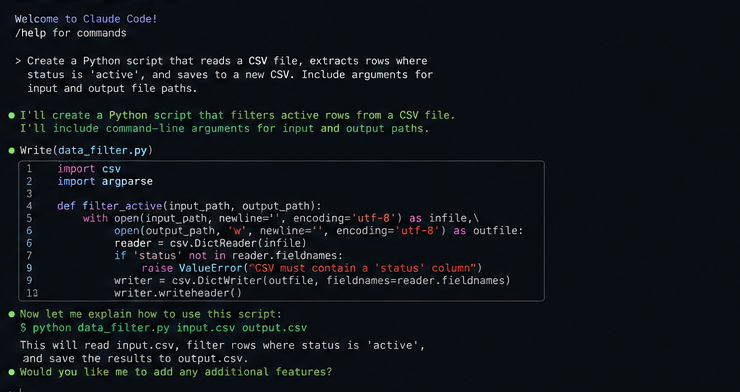
For working developers, Claude Code (the CLI tool) is genuinely useful for tasks like writing tests for existing functions, generating boilerplate, and explaining unfamiliar codebases. The important caveat is that Claude’s suggestions need code review. It can produce code that runs, but that introduces subtle bugs or ignores edge cases. Using it without review is how you end up with a production incident at 2 am.
What Claude Does Not Do Well
Being honest about limitations is what separates useful content from marketing copy, so here is the actual list.
Real-time information. Claude’s training has a cutoff date. It does not browse the internet by default. If you are asking about something that happened recently, Claude may confidently give you outdated information. For current events, prices, or recent research, use a web search first and bring the relevant text into your Claude session.
Visual and spatial reasoning. If you upload an image with a complex chart, infographic, or diagram, Claude can describe it, but it often misreads specific data points. For extracting numbers from visual formats, dedicated OCR tools or even manual checking are more reliable.
Consistency across very long sessions. In sessions that extend to very high token counts, there can be a subtle drift in how Claude interprets earlier instructions. It does not forget them entirely, but it can weigh them differently. For long-running projects, restating your key requirements periodically or using a system prompt through the API helps maintain consistency.
Self-awareness about its own uncertainty. As mentioned earlier, Claude’s confidence level is not always a reliable signal of accuracy. On issues where training data is lacking or contradictory, the system sounds equally confident on issues where it knows it is right. It is good practice to always ask the question, “How confident are you in your conclusion, and what will make you reconsider your answer?”
How to Actually Use Claude Well
The difference between the people who really find value in Claude versus those who reject it in two weeks is solely due to discipline. It is not an empty statement but an observation that I have made repeatedly.
The following is a list of the particular behaviors that are responsible for this difference:
Give Claude a role and a constraint in the same prompt. “You are a skeptical financial analyst. Review this business plan and tell me what the three biggest risks are, in order of severity.” The role shapes the perspective. The constraint forces prioritization. Together, they produce output that is actually useful rather than a comprehensive list of everything that could go wrong.
Separate your task from your context. Before asking Claude to do something, spend two or three sentences giving it the context it needs. Who is the audience? What is the goal? What constraints exist? This feels like extra work, but it consistently produces better first drafts and fewer revision cycles.
Use follow-up questions aggressively. The first answer is rarely the best answer. “Say more about point two.” “What is the strongest objection to that?” “Rewrite this for someone who is skeptical of the premise.” Each of these unlocks a layer of depth that the initial response did not include.
Ask for the format explicitly. Claude defaults to a format that may not match what you need. If you want a table, ask for a table. If you want bullet points, say so. If you want continuous prose, specify that. Format is not cosmetic; it changes how you process and use the information.
Who Should Actually Be Using Claude
Students doing research benefit from Claude’s ability to explain complex topics clearly and at different levels of depth. The habit of asking “explain this like I understand the basics but not the details” is particularly useful here.
Writers and content professionals get the most value from Claude as an editing and structuring tool rather than a generation tool. Using it to restructure your own ideas rather than replace them produces better content and preserves your voice.
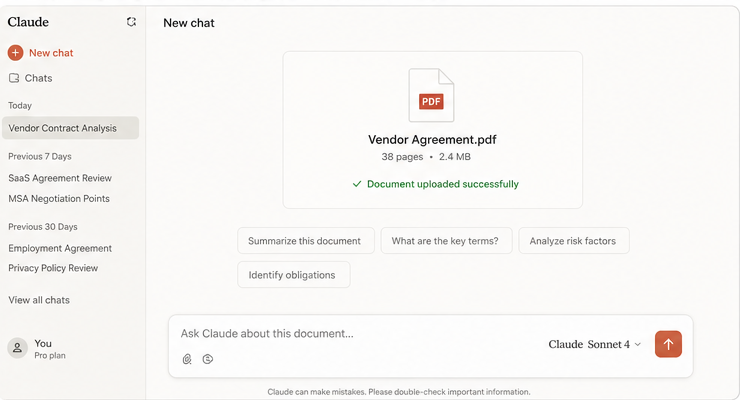
Analyzing documents and making structured reasoning are beneficial for analysts and researchers in their work. The main point is in considering each product as a draft that requires validation, not a complete result.
Programmers should use Claude on routine activities such as tests, code development, documentation, and writing boilerplate. At the same time, they should take full control of architecture design and code review.
People working in businesses that deal with a large amount of written content, such as proposals and reports, will find it useful to apply Claude for preparing drafts and revisions. But it is necessary to learn to write proper prompts.
My Conclusion
Claude is not the tool that replaces your thinking. It is the tool that scales it. If you come armed with a well-defined question, a concrete limitation, and an open mind to challenge the first response, Claude can definitely assist you in increasing your speed and even improving your thinking process.
If you come to it expecting it to do your thinking for you, you will get something that sounds correct but often is not. The model is only as good as the quality of the questions you bring to it.
That is not a limitation unique to Claude. It is the fundamental nature of how these tools work. The people who get the most from AI in 2026 are not the ones who found the best model. They are the ones who learned to use any model with discipline and skepticism.
Start there, and the specific capabilities take care of themselves.