
What Is Claude AI Used For? Real Use Cases and What Nobody Tells You
Most AI content follows the same arc. It lists ten things a tool can do, adds a comparison table, and ends with “start your free trial today.” You leave knowing roughly what you already knew when you arrived.
This article is not that.
I am talking about the ways in which Claude is really being applied, beyond its use on the marketing deck. I want to delve into where this AI really makes a difference and how it can create the illusion of confidence while failing to do so. It’s an interesting contrast, one that can be seen when people rely on Claude for quick results instead of thinking through things.
The Framing Problem Most People Have
When someone first starts using Claude, the instinct is to treat it like a faster search engine or a writing machine. You type a question, you get an answer. You type a request, you get content. That is not wrong exactly, but it captures maybe 20% of what the tool is capable of.
The more useful frame is this: Claude is a thinking environment. It is a space where you can externalize half-formed ideas, pressure-test assumptions, reorganize messy information, and move through analytical tasks faster than you could alone. The word “assistant” undersells it. The word “replacement” oversells it and gets you into trouble. What sits between those two words is where the actual value lives.
With that frame in mind, here is where Claude is genuinely being used and what that actually looks like.
Document Analysis
If you could only pick one thing Claude is reliably, consistently good at, it would be processing long text. Not summarizing it in the generic sense, really working through it.
Here is a concrete example of what this means. Take a standard terms of service document, the kind nobody reads. Copy and paste it on Claude and say: “What are some of the rights that I forfeit through this contract, which may not necessarily be clear from just a cursory read?” You will receive an organized response showing you all those clauses most people usually overlook. Ask further: “Which among these clauses will stand out as being atypical for the industry?”
This is not a trick. Simply said, language models excel at the kind of cognitive labor that involves attentively analyzing complex legal or technical texts. The text is already in their training domain. The task is pattern recognition against a known baseline. Claude does this reliably.
The limitation worth naming: Claude cannot verify whether its interpretation of a legal clause is how a court would interpret it. It can tell you what a clause says and whether it is unusual. It cannot tell you whether it would hold up in litigation. That distinction matters a lot if you are using this for anything with actual legal stakes. Use Claude to understand the document well enough to ask an informed question to a lawyer, not to replace the lawyer.
The same pattern applies to financial documents, research papers, and policy documents. Claude compresses the time between “I have this material” and “I understand what it says.” What happens after that still requires human judgment.
Research Synthesis
There is a specific kind of research task that most knowledge workers dread. You have six sources. They partially overlap, partially contradict each other, and you need to produce a coherent picture. Doing this manually means reading all six, taking notes, identifying the intersections, and then synthesizing them, a process that can take most of a day.
With Claude, the workflow changes significantly. You bring the sources in (either by pasting the text or uploading documents), and you ask Claude to map where they agree, where they diverge, and what questions remain unresolved. You get a structured synthesis in minutes instead of hours.
The important analytical point here is not that Claude is faster. It is the faster process changes what you actually do with your time. When synthesis takes four hours, you do it once and stop. When it takes fifteen minutes, you can do it three times with different framing questions and see what each framing reveals. That iterative capacity changes the quality of thinking you can do, not just the speed.
The watch-out: Claude synthesizes based on what you give it. If your sources have a shared blind spot, which is common in any specialized field. Claude will reflect that blind spot, not correct for it. The responsibility for bringing in diverse and challenging sources stays with you.
Writing Assistance
A significant number of people use Claude to generate content from scratch. Write me a blog post. Write me an email. Write me a product description. This works in the sense that it produces text. Whether that text is good depends almost entirely on how much specific direction you provide.
The more honest and less obvious point is that Claude is more valuable as an editing and restructuring tool than as a generation tool. Here is why.
Claude generates writing that reflects patterns in its training when you ask it to write something. That text is competent, clear, and carries no distinctive perspective. It sounds like the average of a lot of writing. If your goal is average, that is fine. If your goal is to produce something with a real point of view, the from-scratch approach is fighting uphill.
The more effective workflow is to write your rough draft, even a very rough draft, even bullet points. Then bring Claude in to improve structure, tighten language, and identify where the argument is unclear. This preserves your actual thinking and voice while letting Claude do the mechanical work of improving prose. The output is better than Claude’s cold generation, and it is also more yours.
For business communication, specifically proposals, reports, and executive summaries, this workflow is a genuine time saver. A two-hour writing task becomes thirty minutes of thinking and fifteen minutes of Claude-assisted editing.
Coding and Technical Work
The coding use case gets a lot of attention in developer circles, where the relevant question is about Claude Code and terminal integration. That is a real and valuable use case. But there is an adjacent use case that gets far less attention and is arguably more significant in terms of impact: Claude as a technical bridge for non-developers.
The problem it solves is this. There are millions of people who need to automate tasks or manipulate data but do not have programming backgrounds. They know what they want to happen. Rename these files, extract these rows, and transform this format, but they cannot translate that into code. Previously, that meant either hiring a developer, finding a colleague who could help, or just doing the task manually forever.
Claude changes this. Describe the task clearly in plain English and specify what platform you are on (Windows or Mac) and which applications are involved. Claude will write working code with step-by-step instructions for running it. The instructions cover things like where to open a terminal, what command to type, and what output to expect.
The analytical point worth making: this is not just task automation. It is transferable literacy. Each time you go through this process, you learn a little more about how these tasks work. Over a year of occasional use, non-technical people genuinely build mental models of what is programmable and what is not. That changes how they think about workflow problems.
The limitation: Claude-generated code needs testing before it touches anything important. “Works” and “works correctly in all cases” are different things. For small personal tasks, the stakes are low. For anything involving production systems or important data, have someone who codes check the output first.

Strategic Thinking
This one takes longer to find because it does not fit the “tool that produces things” mental model most people start with.
The workflow looks like this. You have a decision to make or a strategy to develop. Instead of asking Claude “what should I do,” you use it as an interlocutor, something to think against. You describe your situation, explain your current thinking, and then ask Claude to identify the assumptions you are making, the alternatives you are not considering, or the strongest case against your current direction.
This is different from asking for advice. Advice is “here is what I recommend.” Interlocution is “here is what your reasoning looks like from the outside, and here is where it has gaps.” The latter is more useful for hard decisions.
A specific prompt structure that works well: “Here is my current plan and reasoning. Tell me the three assumptions I am implicitly making. Then tell me what would have to be true for each assumption to be wrong.” This produces an analysis you can actually act on, not just a list of things to consider.
The reason this works is that it uses Claude’s strengths, pattern recognition, consistency, and lack of ego. Without asking it to do something it is not equipped for, which is knowing your specific situation well enough to make a genuinely good recommendation.
Education and Learning
Students typically use Claude to get answers to questions or to generate text for assignments. Both of these are underuses that also tend to backfire academically. The more valuable use is the one that actually builds knowledge.
The learning workflow that works: Read the material yourself first, even if you do not fully understand it. Then come to Claude with specific points of confusion, not “explain this topic” but “I read that X is true and Y is also true, but they seem to contradict each other. What am I missing?” That specificity forces Claude to address your actual gap rather than giving you a general overview you could have gotten from Wikipedia.
Another effective pattern is using Claude to test your understanding rather than build it. Explain a concept back to Claude in your own words and ask it to identify where your explanation is inaccurate or incomplete. This is a kind of active recall with immediate feedback that genuinely accelerates learning.
The concern worth naming: if you use Claude to skip the initial struggle with material, you also skip the process by which understanding forms. Claude can give you the answer, but not the comprehension that comes from working through the problem. That distinction matters a lot if you actually need to use the knowledge later.

The Pattern Across All These Use Cases
Reading through these use cases, a pattern emerges that is worth making explicit.
Claude is most valuable when you bring real material to it, your rough draft, your document, your specific question, your actual reasoning. It is least valuable when you use it as a starting point from nothing. The quality of what comes out is almost always a function of the quality of what you put in.
This is counterintuitive because most tools work the other way. You get something functional even when you put in minimal effort. Claude’s output at low effort is also functional, but it is generic, sometimes wrong, and often not actually useful for your specific situation.
The investment required is developing the habit of bringing specificity. Specific questions. Specific constraints. Specific examples of what good looks like. That habit is learnable, and it compounds. The more precise your prompts become, the more precise your results are, and the more you trust the tool for higher-stakes work.
That progression from skeptical beginner to genuine heavy user is available to anyone. It just requires treating Claude as a tool that rewards engagement rather than one that rewards delegation.
What This Means for How You Should Start
If you are relatively new to Claude or feel like you have not gotten as much from it as you expected, the single most useful reframe is this: stop thinking about what Claude can do and start thinking about what problem you actually have right now.
Pick one specific task that is currently on your plate. Something real, with actual stakes. Bring the relevant material into Claude, write a prompt that explains your goal and your constraints, and see what happens. Then probe the output. Ask follow-up questions. Push back on things that seem off.
Do that five or six times across different kinds of tasks, and you will have a much clearer picture of where Claude fits in your workflow than any article, including this one, can give you. The understanding is in the use, not in the reading about the use.
That is both the limitation and the invitation of any genuinely useful tool.
FAQs
1. What tasks can Claude AI handle best?
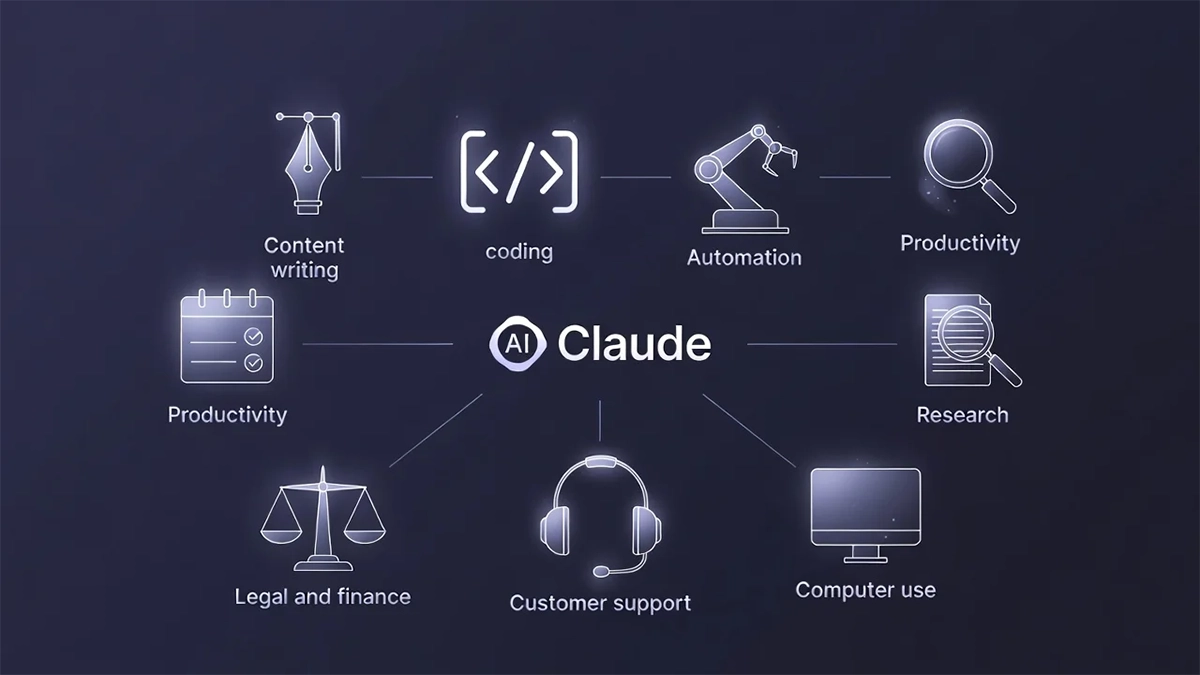
Claude handles writing, analysis, research, and coding support with strong accuracy. It understands long documents, organizes information clearly, and provides structured insights. It also helps with customer queries, summaries, and multi-step problem solving across personal and professional tasks.
2. Is Claude AI good for business use?
Yes, Claude supports many business functions. It manages customer conversations, prepares documents, improves workflows, and reduces manual tasks. Companies use it to create reports, training material, marketing content, and internal communication. It saves time while improving overall productivity and clarity.
3. Can Claude help with coding?
Claude assists developers by debugging code, explaining errors, and writing new scripts. It supports multiple programming languages and simplifies complex concepts. Developers use it for documentation, algorithm planning, learning new skills, and improving project structure. It is useful for beginners and professionals.
4. Is Claude useful for students?
Yes, students use Claude for textbook summaries, notes, and concept explanations. It helps organize research, prepare assignments, and understand difficult topics. Claude supports language practice, idea generation, and revision planning. It makes studying easier, faster, and more structured for learners at all levels.
5. What is Claude AI best used for in daily life?
Claude helps with personal writing tasks, creative brainstorming, planning routines, and learning new topics. It organizes ideas, drafts messages, explains concepts, and offers quick guidance. People use it for productivity, clarity, and everyday decision-making, making daily tasks smoother and more manageable.