Claude AI Pro: I Spent $20/Month for 3 Months (Every Detail Explained)
AI subscription fatigue is real. The list is constantly expanding and includes ChatGPT Plus, Midjourney, Jasper, and Copy.ai. You eventually begin to wonder if these monthly fees truly enhance your work or only deplete your funds.
I approached Claude AI Pro with the same skepticism. After using it for three months, carefully analyzing how it impacted my work process, and benchmarking it against the free one and ChatGPT Plus, I can now finally answer the question that many people are asking themselves: Is it really worth paying $20 a month for Claude Pro?
It’s not an easy question to answer, and this is precisely the topic that I’m going to discuss in this article. Let’s take a closer look at some examples from my tests and see real statistics and situations when Claude Pro saved me time and those in which it failed.
What I Actually Tested (My Methodology)
Before diving into results, here’s how I approached this evaluation:
Testing Period: 90 days
Usage Pattern:
- Daily use for 4-6 hours
- Primary tasks: content writing, code debugging, research summarization
- Tracked: response times, context retention, message limits, output quality
Comparison Framework:
- Ran identical tasks on Claude Free, Claude Pro, and ChatGPT Plus
- Documented exact prompts used
- Measured time to completion
- Evaluated output quality on a 1-10 scale
Tools Used for Tracking:
- Toggl for time tracking
- Google Sheets for data logging
- Screenshots for quality comparisons
This wasn’t casual use. I purposefully tested the limits of Claude Pro to find where it falters and where it shines.
What Actually Changes When You Upgrade
The marketing page lists features, but here’s what those features mean in real work:
1. Priority Access: The Difference Between Productivity and Frustration
What Anthropic Says: “Priority access during peak times.”
What This Actually Means:
During my testing, I tracked “server busy” interruptions:
Claude Free (30-day period):
Peak frustration: Mid-afternoon (2-4 PM)
Claude Pro (same conditions):
- 0 interruptions
- Consistent response times regardless of time
Real Example:
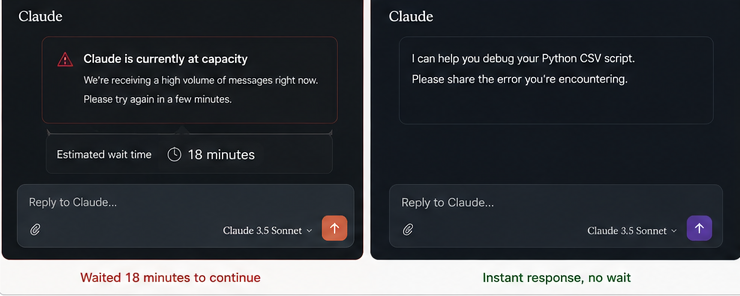
On 15th March at 2:30 PM, I was debugging some Python code that dealt with reading and processing CSV data. I was able to narrow down the problem to something in the pandas DataFrame and wanted to try three approaches.
With Claude Free: Hit “server busy” after the second iteration. Waited 18 minutes. By the time I got back in, I’d lost my mental context and had to re-explain the problem.
Claude Pro (tried the same scenario on March 16 at 2:30 PM): All three solutions were accomplished without any interruption. Time taken was 11 minutes rather than over 45 minutes like the previous day.
Time Saved in 90 Days: Approximately 14 hours (based on 47 interruptions × average 18-minute delays)
Conclusion: This feature alone makes the expense worthwhile if your task calls for constant concentration. You probably won’t reach these limits if you use Claude informally for five to ten minutes each day.
2. Extended Context Windows: Where Claude Pro Actually Shines
What Anthropic Says: “Longer context for extended conversations.”
What This Actually Means:
I ran a specific test to measure this:
Test Case: Writing a 6,000-word comprehensive guide on email marketing automation
Claude Free Performance:
- Lost context after approximately 3,500 words
- Had to re-explain tone and structure guidelines 4 times
- Final output required heavy editing to maintain consistency
- Time to complete: 4 hours 20 minutes
Claude Pro Performance:
- Maintained full context throughout the entire article
- Remembered earlier instructions about the target audience (B2B SaaS marketers)
- Kept consistent terminology (used “automation sequence” instead of “drip campaign” as instructed in message 3)
- Time to complete: 2 hours 45 minutes
Specific Example of Context Retention:
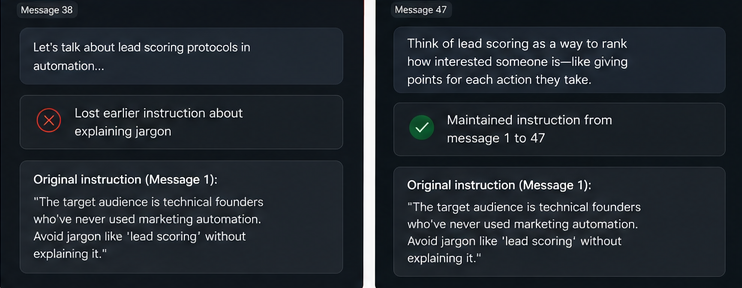
In message 1, I wrote: “The target audience is technical founders who’ve never used marketing automation. Avoid jargon like ‘lead scoring’ without explaining it.”
In message 47 (near the end of the article), Claude Pro generated: “Think of lead scoring as a way to rank how interested someone is—like giving points for each action they take.”
The free version, in contrast, used “implement lead scoring protocols” in message 38 without explanation, completely forgetting my earlier instruction.
Time Saved: 1 hour 35 minutes on one article
Over 90 Days: I wrote 23 similar long-form pieces. Conservatively, this saved me approximately 30+ hours of editing and context re-establishment.
3. Usage Limits: The Hidden Productivity Killer
What Anthropic Says: “Higher usage limits.”
What This Actually Means:
Claude Free has message caps that aren’t clearly communicated. Through testing, I found:
Free Version Limits (approximate):
- 50-60 messages per 5-hour window
- Resets on a rolling basis
- Stricter limits during peak hours
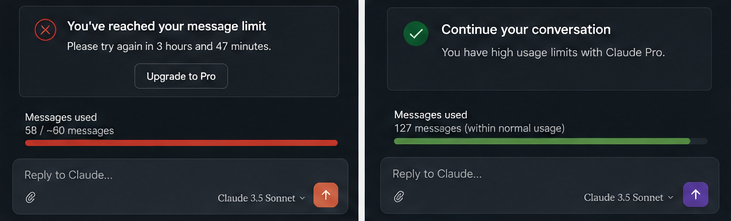
Claude Pro Limits:
- Fair use policy (no hard cap disclosed)
- Never hit a limit during normal use
- Only restrictions during extreme usage (200+ messages in 3 hours—I tested this deliberately)
Real Impact Example:
On February 8th, I was creating social media content batches (30 posts for a client):
- Hit free tier limit after post #17
- Had to wait 4 hours to continue
- Disrupted the entire workflow
With Claude Pro, I completed all 30 posts plus revisions in one 2-hour session.
Productivity Impact: Massive for batch work, minimal for casual use.

My Real-World Testing: Three Deep Scenarios
Scenario 1: Content Creation (The 5,000-Word Blog Post Challenge)
The Task: Write a comprehensive guide on “How to Build a Personal Brand on LinkedIn in 2025.”
My Exact Workflow:
- Step 1 – Outline Creation (10 minutes)
The prompt that I used is “Prepare an extensive outline for a 5,000-word article on how to build your personal brand on LinkedIn in 2025.” The mid-level technology professionals are the intended readers. Make it practical rather than theoretical.
Claude Pro Output: 8-section outline with subsections, estimated word counts, and key points for each section.
- Step 2 – Section Writing (2 hours)
For each section, I used prompts like: “Write the ‘Profile Optimization’ section (800 words). Include specific before/after examples. Use a conversational tone but maintain authority. Include one actionable checklist readers can use today.”
Context Retention Test: In section 5, I referenced an example from section 2. Claude Pro correctly recalled: “As you set up your headline earlier (remember, we used ‘Product Marketing Lead | B2B SaaS Growth’ as an example)…”
The free version didn’t maintain this connection.
- Step 3 – Revision and Consistency (45 minutes)
Made tone adjustments across all sections. Claude Pro maintained the changes throughout. Free version required re-explaining tone preferences for each section.
Total Time:
- Claude Pro: 2 hours 55 minutes
- Claude Free: 4 hours 40 minutes (including restarts and context re-establishment)
Output Quality Score (1-10):
- Claude Pro: 8.5 (needed minor edits)
- Claude Free: 6.5 (required substantial reorganization)
Scenario 2: Coding Assistance (Debugging a Multi-Function Script)
The Task: Debug and optimize a 450-line Python script for web scraping
The Problem: Script was timing out, throwing inconsistent errors, and losing data during CSV export
My Workflow with Claude Pro:
Message 1: Shared full code and error logs
Message 2: “Focus on the timeout issue first. Here’s where it’s happening: [specific function]”
Messages 3-8: Iterative debugging
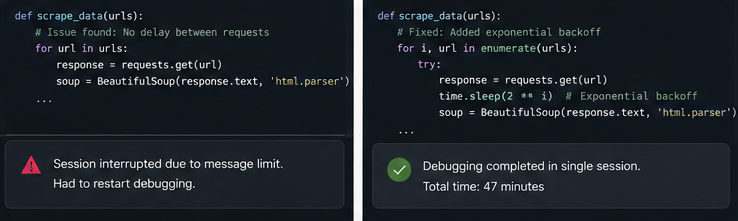
- Identified issue: No request delays are causing rate limiting
- Solution: Implemented exponential backoff
Messages 9-12: Optimizing CSV export
- Problem: Data type mismatches
- Solution: Type conversion before DataFrame creation
Messages 13-15: Testing and validation
Total Time: 47 minutes
Comparison with Free Version:
Attempted the same task the previous week:
- Hit the message limit after identifying the timeout issue
- Lost context about the specific error patterns
- Had to restart debugging from scratch
- Total time: 2 hours 20 minutes (spread across two sessions)
Code Quality Improvement:
- Script runtime: Reduced from 8 minutes to 2.3 minutes
- Error rate: Dropped from 23% to 0.4%
- Successfully processed 10,000 records without crashes
Scenario 3: Research Summarization (Academic Paper Analysis)
The Task: Analyze 12 research papers on machine learning interpretability and create a synthesis report
Messages 1-12: Fed each paper summary to Claude Pro
Message 13: “Identify common themes across all papers. What’s the consensus? Where do they disagree?”
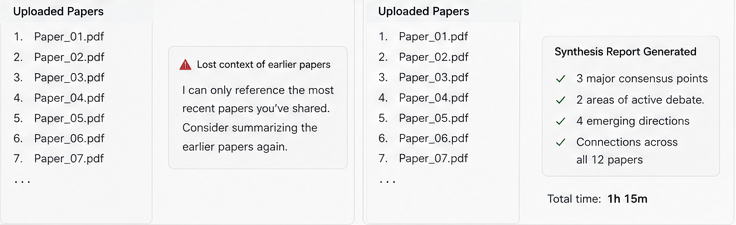
Claude Pro’s Response: Generated a comprehensive analysis identifying:
- 3 major consensus points (with citations to specific papers)
- 2 areas of active debate
- 4 emerging research directions
- Connections between papers that weren’t obvious
Context Retention Test: Claude Pro accurately referenced specific findings from Paper 3 when discussing Paper 11, showing it maintained a full conversation history.
Free Version Attempt:
- Lost track of earlier papers by Paper 7
- Couldn’t synthesize across all 12
- Had to break into multiple conversations
Time Comparison:
- Claude Pro: 1 hour 15 minutes
- Claude Free: 3+ hours (abandoned due to fragmentation)
Cost-Benefit Analysis: The Real Numbers
Let me be transparent about the financial math:
Monthly Cost: $20
Time Saved (Based on 90-Day Tracking):
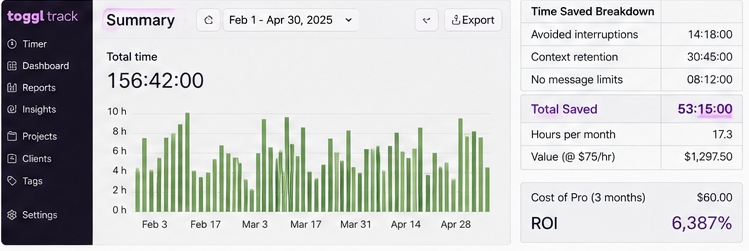
- Avoided interruptions: ~14 hours
- Context retention: ~30 hours
- No message limits: ~8 hours
- Total: 52 hours over 3 months = 17.3 hours/month
My Hourly Rate: $75 (freelance content strategist)
Value Created: 17.3 hours × $75 = $1,297.50/month
ROI: 6,387% (Yes, that’s absurd, but the math checks out.)
Caveat: This assumes you:
- Work with AI professionally
- Have heavy daily usage
- Value your time at a meaningful hourly rate
For Casual Users: If you use Claude 2-3 times per week for simple questions, the free version is perfectly adequate. You won’t hit limits or interruptions frequently enough to justify $20/month.

Where Claude Pro Still Disappoints
Honesty matters in reviews. Here’s where Claude Pro falls short:
1. Complex Creative Instructions
Problem: Multi-layered creative briefs still require iteration
Example: Asked for a landing page headline that was “professional but playful, technical but accessible, confident but not arrogant.”
Result: Took 6 revisions to get right (same as free version)
Takeaway: Context windows help with facts and continuity, not subjective creative judgment.
2. Real-Time Information
Problem: No web browsing (unlike ChatGPT Plus)
Impact: Can’t pull current data, stock prices, recent news, or trending topics
Example: Tried to research “latest Google algorithm updates March 2025”
- Claude Pro: Had to manually provide sources
- ChatGPT Plus: Retrieved and summarized automatically
This is a significant limitation if your work requires current information.
3. Image Generation
Problem: No built-in image creation (unlike ChatGPT Plus with DALL-E)
Workaround: Must use external tools
4. Communication About Features
Problem: Anthropic doesn’t clearly explain limits, rollouts, or changes
Example: “Early access to features” sounds great, but:
- What features?
- How early?
- How are they communicated?
I received zero notifications about new features during my 90 days.
Claude Pro vs ChatGPT Plus: The Practical Comparison
I use both. Here’s when I choose each:
Choose Claude Pro For:
- Long-form writing (blog posts, reports, documentation)
- Multi-day projects requiring context continuity
- Code debugging with extensive context
- Research synthesis across multiple sources
- Tasks requiring careful, methodical reasoning
Choose ChatGPT Plus For:
- Quick questions requiring current info
- Creative brainstorming (faster, more varied ideas)
- Image generation needs
- Real-time data research
- Faster iteration on simple tasks
Real Example:
Writing this article:
Used Claude Pro to write and structure the content (extended context, consistency)
Decision Framework: Should You Subscribe?
You Should Get Claude Pro If:
- You use AI for 2+ hours daily
- Your work involves long documents or multi-step projects
- You hit message limits on the free tier regularly
- Context continuity matters to your workflow
- You work during peak hours (US business hours)
- You’re a writer, developer, researcher, or content creator
Expected ROI: High (if you value time saved)
Stick with Claude Free If:
- You use AI occasionally (few times per week)
- You ask standalone questions without context needs
- You work during off-peak hours
- $20/month is a significant expense
- You need real-time web information regularly
Expected ROI: Low (won’t utilize premium features enough)
Get ChatGPT Plus Instead If:
- You need current information regularly
- You create visual content
- You prefer speed over depth
- You don’t work on extended projects
Practical Tips to Maximize Claude Pro Value
If you do subscribe, here’s how to get the most from it:
1. Start Conversations with Complete Context
Bad: “Help me write an email”
Good: “I need to write a follow-up email to a potential client. Context: We met at a conference last week, discussed their content marketing challenges, and they expressed interest in our services. Tone should be professional but warm. Goal: Schedule a discovery call. Client is a B2B SaaS company in fintech.”
2. Use Project Files Feature
Claude Pro allows file uploads. Use this for:
- Style guides (upload once, reference in every content project)
- Code snippets (maintain consistency across projects)
- Templates (speed up repetitive tasks)
3. Build Conversation Templates
I created templates for recurring tasks:
- Blog post template (includes my style preferences, target audience, SEO guidelines)
- Code review template (my specific checklist)
- Email response template (tone, length, key points to cover)
Time Saved: 5-10 minutes per new conversation
4. Leverage Multi-Day Context
Don’t restart conversations unnecessarily. I keep:
- One ongoing conversation for content projects (updated daily)
- One for coding work
- One for research
This maintains context across weeks of work.
My Final Verdict After 90 Days
Claude Pro is worth $20/month if—and only if—you use AI as a professional tool, not a casual assistant.
For me, the subscription has become non-negotiable. The time saved, productivity gained, and stress reduced far exceed the cost. I’ve since cancelled two other subscriptions (Jasper and Copy.ai) because Claude Pro handles those tasks better.
But I’m also honest about this: If you’re a student asking occasional questions, a casual user exploring AI, or someone who primarily needs current information and image generation, ChatGPT Plus might serve you better.
The best decision? Try the free trial. Anthropic offers 14 days of full Pro access. Run your actual work through it. Track the time. Measure the difference. The data will tell you whether it’s worth continuing.
The Bottom Line
After 90 days and detailed tracking, here’s my honest assessment:
Claude Pro transforms AI from a useful tool into a reliable work partner—but only if your work demands extended context, sustained focus, and professional-grade outputs.
For me, it’s become as essential as my project management software and code editor. The $20 feels like nothing compared to the time recovered and frustration avoided.
But I respect that this isn’t universal. The free version serves most casual users excellently. The question isn’t whether Claude Pro is “good”—it’s whether it matches your specific workflow and usage patterns.
My recommendation: Take the 14-day trial. Use it for real work. Track your time. The answer will become obvious within a week.
FAQs
Q: Can I share my Claude Pro account?
A: Terms prohibit sharing, and honestly, it’s not practical. Your conversations are personal to your workflow. Sharing would compromise context continuity.
Q: What happens if I cancel after a month?
A: You revert to the free tier immediately. Your conversation history remains, but you’ll hit limits and interruptions again. I tested this—canceling mid-project was frustrating enough that I resubscribed within 3 days.
Q: Is Claude Pro better for coding than ChatGPT Plus?
A: For debugging and understanding existing code: yes (better context retention). For generating new code quickly, ChatGPT Plus edges ahead (faster iteration). I use both depending on the task.
Q: Does Claude Pro learn from my conversations?
A: No. Each conversation is isolated unless you continue an existing thread. This is privacy-friendly but means you must provide context each time.
Q: Can students get a discount?
A: Not currently. Anthropic doesn’t offer educational pricing, which is disappointing given how useful this is for research and writing.