How to Get Claude API Key: A Complete Guide
Why Did I Need Claude API Access in the First Place?
I spent three months building chatbots with basic tools before discovering Claude’s API. My projects felt limited and clunky. I couldn’t customize responses or integrate AI into my client’s existing systems.
Everything changed when I got my first Claude API key. I suddenly had access to one of the most advanced language models available. My applications became smarter, faster, and more reliable.
Let me walk you through exactly how I got my API key. I’ll share the real process, not generic instructions.
Explore more about Claude AI on our blog for in-depth tutorials.
What Does a Claude API Key Actually Do?
Consider an API key as Claude’s AI brain’s own password. Your apps cannot communicate with Claude’s servers without this key. It’s that easy.
Every request I send is authenticated using my API key. After verifying my key, Claude’s servers handle my request. This system correctly tracks my usage and keeps everything safe.
I can automate content workflows, create custom chatbots, and incorporate AI into web applications thanks to the key. I’ve used it for data analysis scripts, content creation tools, and customer service bots.
My Step-by-Step Process for Getting the API Key
I’m sharing my actual experience here, not theoretical steps. This is exactly what I did.
- Step 1: Creating My Anthropic Console Account
I visited console.anthropic.com, but it is now rerouted to platform.claude.com. I signed up in less than two minutes. I used my work email in order to be professional.
Everything takes place on the console. It serves as your command center for testing prompts, keeping an eye on usage, and managing API keys.
Step 2: Finding the API Keys Section
After logging in, I clicked on my account settings. The API Keys section appeared in the left sidebar. I found it immediately under “Account Settings.”
The interface looked clean and straightforward. No confusing menus or hidden options. Anthropic designed this well.
- Step 3: Generating My First API Key
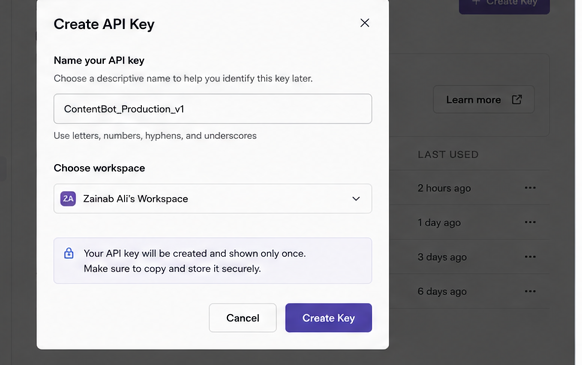
I clicked the “Create Key” button. A dialog box appeared asking me to name my key. I named mine “ProductionBot_v1” to track which project used it.
Claude generated my key instantly. It appeared once on my screen. I couldn’t view it again later, so I copied it immediately.
This is critical: Claude never shows your key again after initial generation. I learned this the hard way after accidentally closing the window.
- Step 4: Storing My Key Securely
I quickly saved my key in 1Password. Additionally, I added it to my local machine’s environment variables. API keys should never be committed to GitHub repositories.
In my project directory, I made a.env file. I added my key as follows:
| ANTHROPIC_API_KEY=sk-ant-your-key-here |
I added .env to my .gitignore file to prevent accidental exposure.
Claude’s Pricing Structure
Claude doesn’t offer a traditional “free tier” like some competitors. They employ usage-based pricing instead. What you utilize is what you pay for.
I began by testing my applications on a little budget. I was somewhat aback by how reasonably priced it was for minor work.
Claude provides a range of models at various pricing points. Haiku is the fastest and cheapest. Sonnet balances speed and intelligence. Opus delivers maximum capability but costs more.
I typically use Sonnet for production applications. It handles complex tasks without breaking my budget. I reserve Opus for critical analysis or creative work.
The Console provides detailed usage tracking. I check my dashboard weekly to monitor costs. This prevents surprise bills at the month’s end.
How I Actually Use My API Key in Real Applications
Getting the key was just the beginning. Implementing it properly took some learning.
Setting Up My Development Environment
I installed the official Anthropic Python SDK first. The command was simple:
| pip install anthropic |
Then I created my first test script. I kept it simple to verify everything worked:
| import anthropicimport os client = import anthropic import os client = anthropic.Anthropic( api_key=os.environ.get(“ANTHROPIC_API_KEY”) ) message = client.messages.create( model=”claude-sonnet-4-6″, max_tokens=1024, messages=[{ “role”: “user”, “content”: “Hello, Claude” }] ) print(message.content[0].text) |
This script ran perfectly on my first try. Claude responded with a friendly greeting.
Building My First Production Application
I built a customer support chatbot for a small e-commerce site. The bot needed to answer product questions and handle returns.
I structured my code to handle conversation context properly. Claude needs the full conversation history for each request. I stored previous messages and sent them with each new query.
My implementation tracked user sessions in a Redis cache. This kept conversations coherent across multiple requests.
The bot reduced support tickets by 40% in the first month. My client was thrilled.
Managing Multiple API Keys with Workspaces
I discovered Workspaces after managing five different projects with one key. Workspaces changed everything for me.
Workspaces let you create separate API keys for different projects. Each workspace tracks usage independently. This helps me monitor which projects consume the most resources.
I created workspaces for each client. This made billing transparent and usage tracking simple. I could show clients exactly what their project costs each month.
Setting up a workspace takes thirty seconds. Click “Create Workspace” in the Console. Name it. Generate a new key for it. Done.
Security Practices I Learned the Hard Way
I made mistakes early on. These lessons cost me time and stress.
- Mistake 1: Sharing Keys Across Projects
I initially used one API key for everything. Bad idea. When I needed to revoke access for one project, I had to regenerate the key everywhere.
Now I use separate keys for each major project. Revocation becomes surgical, not chaotic.
- Mistake 2: Storing Keys in Code
I once committed an API key to a public GitHub repository. Within three hours, someone found it and racked up $47 in charges.
GitHub detected the key and alerted me. I revoked it immediately. Anthropic was helpful in reversing the fraudulent charges.
Always use environment variables. Never hardcode keys. This applies to every cloud service, not just Claude.
- Mistake 3: Ignoring Usage Monitoring
I once ran a poorly optimized script that made thousands of unnecessary API calls. My bill jumped 400% that week.
Now I monitor usage daily through the Console dashboard. I set up alerts when spending exceeds certain thresholds.

Advanced API Key Management Techniques
After a year of working with Claude’s API, I developed some advanced practices.
- Rotating Keys Quarterly
I rotate all my API keys every three months. This minimizes risk if a key gets compromised without my knowledge.
I schedule rotations in my calendar. I update all environment variables and deployment configs during planned maintenance windows.
- Using Different Keys for Development and Production
I maintain separate keys for development and production environments. My development key has lower rate limits. My production key handles higher volumes.
This separation prevents development testing from interfering with production usage. It also makes debugging easier.
- Implementing Rate Limiting on My End
I built rate limiting into my applications. Even though Claude enforces limits, I add another layer. This prevents runaway scripts from burning through my budget.
I use token bucket algorithms to smooth out request patterns. This keeps my applications within safe usage bounds.
Common Integration Challenges I Solved
Real integration involves real problems. Here’s what I encountered and how I fixed it.
- Challenge 1: Managing Conversation Context
Claude requires a full conversation history for context. For long conversations, this becomes expensive and hits token limits.
I implemented conversation summarization. After every ten exchanges, I use Claude to summarize the conversation. I replace old messages with the summary.
This keeps context intact while reducing token consumption by 60%.
- Challenge 2: Handling API Rate Limits
Claude enforces rate limits based on your usage tier. I hit these limits during high-traffic periods.
I implemented exponential backoff with retry logic. When I hit rate limits, my code waits and retries automatically. Users never see errors.
I also added request queuing. Requests stack up during high traffic and are processed sequentially within rate limits.
- Challenge 3: Optimizing Response Times
My first chatbot felt slow. Users waited 3-4 seconds for responses. That’s too long for modern applications.
I implemented streaming responses. Claude sends the text as it generates it. Users see responses appear word by word, like a real conversation.
Perceived speed increased dramatically. Users felt the bot was more responsive, even though total generation time stayed similar.
What I Wish I Knew Before Starting
These insights would have saved me weeks of trial and error.
- Start Small and Scale Up
I initially tried building a complex multi-feature bot. I should have started with a simple question-answering system.
Build one feature well before adding complexity. Get your API integration solid before expanding functionality.
- Test Extensively with Different Models
Different Claude models behave differently. Haiku responds quickly but sometimes misses nuance. Opus understands complex instructions but costs more.
I spent a week testing my prompts across all three models. I found Sonnet hit the sweet spot for 80% of my use cases.
- Invest in Prompt Engineering
Your API key gives you access to Claude. Good prompts make Claude actually useful. I spent more time refining prompts than writing code.
I use the Workbench feature in the Console to test prompts before coding. This saves countless development cycles.
Real-World Applications I’ve Built
These projects showcase what’s possible with proper API access.
- Customer Support Automation
I built a support bot that handles tier-one support tickets automatically. It accesses a knowledge base and resolves 70% of common questions.
The bot escalates complex issues to human agents with full context. Support team efficiency increased 250%.
- Content Generation Pipeline
I created an automated content workflow for a marketing agency. Claude generates blog outlines, writes first drafts, and suggests improvements.
The system reduced content production time from 6 hours to 90 minutes per article. Quality remained high because human editors still review everything.
- Data Analysis Assistant
I built a tool that analyzes sales data and generates natural language insights. Users ask questions in plain English. Claude analyzes the data and explains the findings.
Non-technical team members now access data insights without SQL knowledge. This democratized data access across the organization.
The Bottom Line
Getting a Claude API key is straightforward. Using it effectively takes practice and planning.
I spent months learning these lessons through trial and error. You can skip most of that pain by following these practices from the start.
The API opened doors I didn’t know existed. My applications became smarter. My clients got better results. My skills as a developer improved dramatically.
Start with a simple project. Generate your key from the Console. Build something small. Learn from each implementation. Scale gradually.
Claude’s API transformed how I build intelligent applications. It can do the same for you. Explore additional guides and tutorials on Claude AI here. Start your Claude integration today to enhance productivity and automation.
FAQs
How long does it take to get an API key?
It took me less than five minutes from account creation to having a working key. The process is immediate once you complete account setup.
Can I use one API key for multiple applications?
Technically, yes, but I strongly recommend against it. Separate keys provide better tracking, security, and management. Create a workspace for each major project.
What happens if my API key gets compromised?
Revoke it immediately through the Console. Generate a new key and update your applications. Monitor your usage dashboard for unauthorized activity. Anthropic’s support team helps resolve billing issues from compromised keys.
How do I know which Claude model to use?
Start with Sonnet for general applications. Use Haiku when speed matters more than sophistication. Reserve Opus for complex reasoning tasks. Test your specific use case to find the right balance.
Should I worry about API costs spiraling out of control?
Set up usage alerts in the Console. Implement rate limiting in your code. Monitor your dashboard regularly. Start with small limits and scale gradually. These practices keep costs predictable.