
Understanding Claude Limits: A Real-World Guide for Free and Pro Users (2026)
If you use Claude regularly, you’ve probably hit a wall at least once. Mid-conversation, mid-project, mid-thought, Claude suddenly slows down, shows a vague warning, or just stops responding. No clear explanation. Just friction at the worst possible moment.
I’ve been using Claude since version 2, and I’ve tested every major update since. Over time, I’ve learned that Claude’s limits aren’t just technical restrictions, they actually shape your entire experience of the tool. Understanding them isn’t optional if you want to work efficiently.
This guide explains Claude limits in plain terms: what they are, why they exist, how they differ between plans, and most importantly, how to work around them without violating any policies.
Throughout this article, we also reference helpful resources from our site, ClaudeAIWeb, where we publish detailed Claude guides and updates.
Why Claude Has Usage Limits
The common question is: why does Claude have a limit?
Before getting into numbers, it helps to understand the why.
The short answer Anthropic gives is “fairness and system stability.” That’s partly true. Claude handles millions of conversations daily, and without any guardrails, a small number of heavy users could strain the infrastructure and slow things down for everyone else.
But the fuller answer is economics. It costs a lot of money to run a big language model like Claude. Large amounts of computing power are needed to process a 50-page PDF, debug a 1,000-line codebase, or conduct a multi-hour research session. Limits enable Anthropic to operate a viable service on a large scale without the quality of every encounter declining.
Understanding this changes how you think about the restrictions. They aren’t arbitrary, they reflect real resource costs. That doesn’t mean they’re always well-communicated (Anthropic is notably vague about exact numbers), but it does mean working with them is more productive than resisting them.

Does Claude Free Have a Limit?
Yes, and it’s more layered than most users realize.
The free plan has three distinct types of restrictions running simultaneously:
1. Daily message limits
Free users can typically send around 25–30 messages per day before hitting the daily cap. This resets roughly every 24 hours. During peak traffic periods, such as weekday mornings in North America, you may actually hit the limit faster because Anthropic throttles free-tier access more aggressively when servers are under load.
From personal testing: on a quiet Sunday, I pushed past 28 messages without interruption. On a busy Tuesday morning, I hit a soft limit warning around 20.
2. The rolling 5-hour window
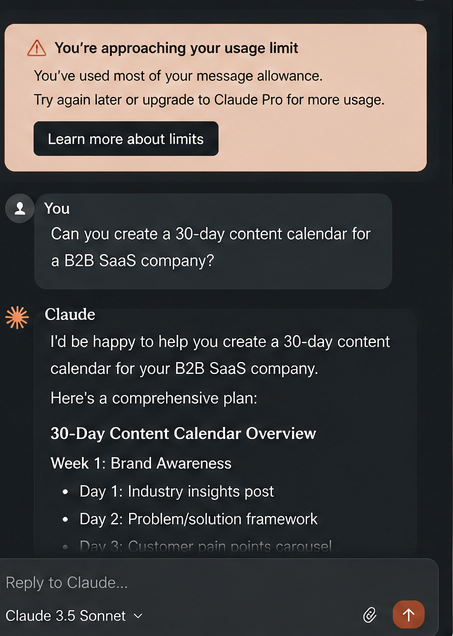
This one catches people off guard. Even if you haven’t hit your daily message count, rapid-fire prompting within a short window can trigger a temporary pause. Claude doesn’t publish the exact threshold, but in practice, sending 10–15 substantial messages within an hour consistently triggers the warning: “You’re approaching your usage limit.”
This is the most confusing limit for new users, because it feels arbitrary. You still have daily messages remaining, but the rate of consumption triggered the check.
3. Context window exhaustion
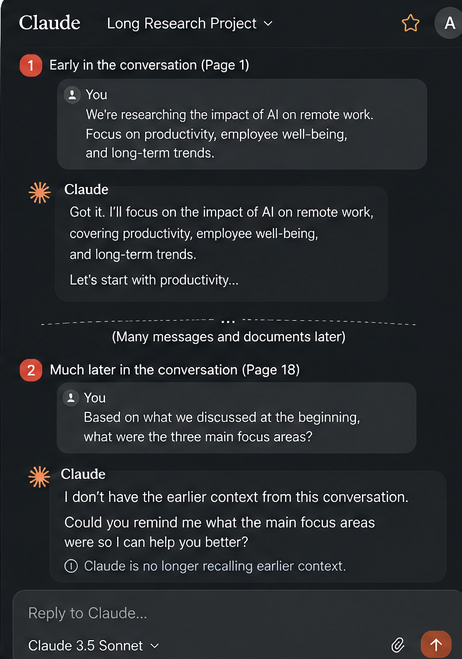
This isn’t a “limit” in the traditional sense, but it has the same effect. Claude currently supports a context window of up to 200,000 tokens (as of the Claude 3.x and Claude 4 generation). That sounds enormous. But in practice, pasting in long documents, running extended back-and-forth coding sessions, or uploading multiple files burns through context fast.
When the context fills up, Claude doesn’t tell you clearly. What you notice is that it starts forgetting earlier parts of the conversation, gives inconsistent answers, or seems to lose the thread of a project. Many users interpret this as Claude “getting dumb”; it’s actually just running out of working memory.
What Changes With Claude Pro?
Claude Pro costs around $20/month (USD). Whether that’s worth it depends entirely on how you use the tool. Here’s what actually changes:
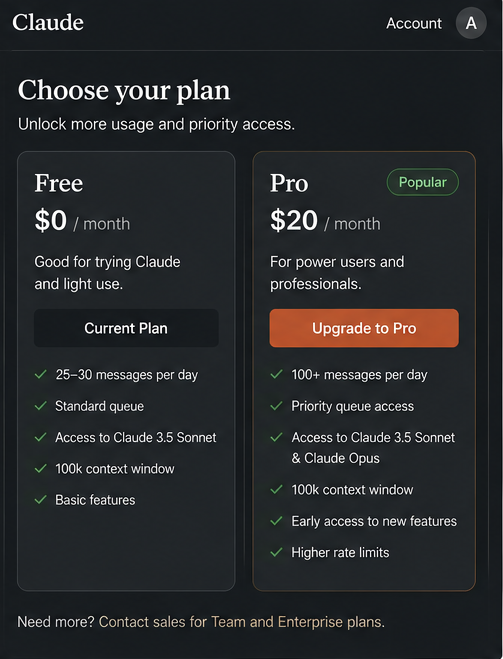
Dramatically higher daily message capacity. Pro users typically get 5x–10x the daily allowance of free users. Most professional use cases, like content writing, coding projects, and research, fit comfortably under this ceiling without interruption.
Priority queue access during peak hours. This is the upgrade I noticed most. On the free plan during busy periods, Claude’s responses slow noticeably, sometimes taking 10–15 seconds per reply. On Pro, responses are consistently fast regardless of the time of day. For anyone who works to deadlines, this alone justifies the cost.
Relaxed rate limits. The rolling 5-hour window still exists on Pro, but the threshold is significantly higher. In my experience, you’d have to be pushing Claude very hard. Think multiple hours of continuous intensive use before triggering it.
Access to the most capable models. Some Claude model versions (like Claude Opus) are gated behind Pro. If you’re using Claude for complex reasoning tasks like multi-step analysis, nuanced writing, and advanced code review, the model you’re accessing on free versus Pro differs meaningfully.
The “5-Hour Limit” Explained Clearly
Searches like “Claude code approaching 5-hour limit” or “Claude 5-hour limit reached” come up constantly in Claude communities. Here’s what’s actually happening.
The 5-hour limit is not a session timer. It’s a rolling usage window. Claude tracks cumulative token consumption and message frequency over a recent time period. If that figure crosses an internal threshold—likely calculated per user account—Claude slows down or temporarily pauses responses.
What triggers it most reliably:
- Sending prompts faster than roughly one every 2–3 minutes over a sustained period
- Repeatedly requesting very long outputs (detailed code, long essays, full document analyses)
- Working with large file uploads in sequence
When it’s triggered, you’ll see messages like “You’re approaching your usage limit” or “Please slow down”. At this point, the practical options are: wait 15–30 minutes and resume, or spread your work across a longer time window.
One important note: some users search for ways to bypass Claude limits through cookie clearing, incognito mode, or account switching. These methods either don’t work reliably or put your account at risk. Anthropic ties limit to account credentials, not browser sessions. There’s no clean bypass—and attempting to circumvent them violates the usage policy.
Smart Strategies That Actually Work
Rather than fighting the limits, here are techniques I’ve used to genuinely reduce how often I hit them:
Batch your prompts. Instead of sending three separate questions about the same topic, combine them into a single structured message. Ask Claude to answer part 1, then part 2, then part 3, all in one go. This conserves your message count significantly.
Use clear, complete prompts the first time. Vague prompts lead to follow-up clarifications, which eat into your daily count. Spending 60 extra seconds writing a precise prompt often saves 3–4 follow-up messages. For writing tasks, specify tone, length, audience, and format upfront.
Start new conversations for new topics. Context is shared across a conversation, which means a very long chat session gradually degrades Claude’s accuracy on earlier topics as the context fills. When you switch to a different project or task, start a fresh chat. It keeps Claude sharp and conserves the context window.
Work in focused blocks, not marathon sessions. Because of the rolling rate limit, spreading your Claude usage across the day is more efficient than a single 3-hour sprint. Two 90-minute sessions with a break in between will almost never trigger the 5-hour warning, while one concentrated 3-hour session often will.
Use Claude for drafting, not publishing. On the free plan, especially, use Claude to create drafts and frameworks, then revise and refine in your own writing tool. This lets you extract maximum value from each interaction without needing endless back-and-forth polish passes.
Free vs Pro Claude Limits Comparison
| Feature | Free Plan | Claude Pro |
| Daily messages | ~25–30 | 100+ |
| Priority access | No | Yes |
| Peak-hour delays | Common | Rare |
| Context window | 100k tokens | 100k tokens |
| Rate limits | Strict | Relaxed |
In my opinion, Claude Pro isn’t “premium”, it’s what Claude should feel like by default.
Can You Bypass Claude Limits?
Users often ask about Claude 5 hour limit bypass or how to bypass Claude message limit.
Claude does not officially allow bypassing limits. Workarounds violate usage policies and risk account restrictions.
However, you can manage limits smartly.
Claude Limits for Coders and Developers
Developers hit limits faster than almost any other user group. Here’s why: code prompts are inherently token-heavy. Pasting in a function, asking Claude to refactor it, pasting the updated version back, asking for tests, and then debugging those tests. That loop can burn through 10–15 messages quickly, and each exchange might involve hundreds of lines of code.
Practical approaches that help:
- Ask for modular, function-level changes rather than rewriting entire files. This keeps response length manageable and lets you test incrementally.
- Request code with inline comments rather than asking for a separate explanation. Two messages become one.
- If you’re debugging, describe the error and paste only the relevant function, not the whole codebase. Claude doesn’t need to see code that isn’t involved in the problem.
For developers using the API rather than the web interface, the limits work differently. API access uses a tier-based system based on tokens per minute and requests per minute, not daily message counts. Check Anthropic’s documentation for current API rate limits, as these change with plan level and usage history.

Does Claude Limit API Users Differently?
Yes. API users face separate rate and token limits. These depend on pricing tiers and contracts. Web users mainly face daily message caps. API users manage requests per minute. Always check official documentation before deploying applications.
Should Students and Writers Upgrade to Pro?
For students, it depends on intensity. Casual use—occasional essay help, concept explanations, and study flashcards, fits comfortably within the free tier. But during exam season or thesis writing, hitting the daily limit mid-study session is genuinely disruptive. A single month of Pro during an intensive period is worth considering.
For writers, the calculus is different. If writing is your profession or primary side income, the $20/month is easy to justify. The combination of higher message limits, faster responses, and access to Claude’s most capable models meaningfully improves both the speed and quality of output. I switched to Pro permanently after a single project where free-tier limits interrupted three separate client deliverables in one week.
A Note on Accuracy and Staying Current
Over the previous two years, Claude’s limit structure has undergone multiple modifications. Older guidelines cite numbers that are out of date, some of which are still showing up in search results. The numbers in this article are based on my tests as of early 2026, but if you’re considering a membership, I strongly advise you to check the current limits immediately at claude.ai and Anthropic’s support sites.
Final Thoughts
Claude’s free plan is genuinely more useful than most competing free tiers. But its limits are real, and they’re felt most sharply by the users who benefit most from Claude: researchers, developers, writers, and students doing intensive work.
The Pro upgrade isn’t a luxury. For anyone relying on Claude professionally, it’s the baseline experience. Once you understand how the limits work on daily caps, rolling windows, and context exhaustion, you can structure your workflow to stay productive on whichever plan you’re on.
The limits aren’t the enemy. Knowing them puts you in control.
For deeper Claude analysis, comparisons, and practical guides, visit our latest articles on ClaudeAIWeb.
FAQs
Does Claude AI have a daily limit?
Yes. Free users can typically send 25–30 messages per day before hitting the cap. Pro users get a substantially higher allowance, generally 100+ messages daily. Limits reset on a rolling 24-hour basis.
What does “approaching your usage limit” mean?
It usually signals that you’ve consumed a significant portion of either your daily message count or your rolling-window rate allowance. Slowing down your prompt frequency or waiting 15–30 minutes typically resolves it.
Does Claude Pro remove all limits?
No. Pro significantly raises the limits and gives priority queue access, but hard ceilings still exist. In practice, most professional use cases won’t encounter them.
Is the 5-hour limit a session timer? No. It’s a rolling usage metric tied to message frequency and token consumption, not time spent in the chat interface.
Can you bypass Claude’s limits legally?
No bypass methods are officially supported. Workarounds using incognito mode, cookie clearing, or alternate accounts violate the usage policy. Optimizing your prompting habits—batching, using clearer prompts, starting fresh conversations—is the legitimate way to get more out of your allowance.