Claude for Students: How to Study Smarter Without Cheating Yourself
Claude for Students: Study Prompts and Tips

Students continue to ask the same question: Can I cheat with Claude? No guide would like to get this question from anyone. They just give you a list of prompts; you go.
It was very discouraging for me and so I developed my own guideline based on questions. What’s the price of Claude for Students? What are the helpful attributes? In what way is learning cheating? Don’t worry, you will find my critique there too as each tool has its own weaknesses.
Does Claude Have a Student Plan?
Well, let’s deal with the price matter first. Anthropics does not have a student discount for each separate student. Reviewing the pricing page of the company, there is no mention of any student price or student plan or even a coupon.
However, students still have three real routes.
| Route | Cost | Best for |
| Free plan | $0 | Light daily study and feedback |
| Pro plan | 20monthly(17 annual) | Exam season and heavy reading |
| Campus access | Set by your university | Students at partner schools |
Campus access warrants a second look. Claude for Education is sold by Anthropic to universities, not people. Northeastern University, London School of Economics, and Champlain College have already made deals. Contact your university’s IT department to find out if they have it. If they do, then you can gain full access for free.

Plans change often, so check claude.com/pricing before you pay.
What the Free Plan Actually Covers
The majority of students do not need to pay. The free plan works well with explanations, outlines and draft feedback. It can also read pasted notes and uploaded files.
Nevertheless, it has its boundaries. Now, the free version is available without Research, Claude Code, and Claude in Chrome and also comes with the lowest usage limits. So a lengthy study session can get to the end of the day very quickly. At that time, you wait for the reset.
My word of advice is straightforward. Try the free plan for 14 days. Note the frequency of times you reach the limit. Then decide.
My initial thought: No Pro Purchase for September. Purchase it when you need it. It’s worth the money for finals week. But a relaxed week in October doesn’t.
Learning Style
Here’s the feature I wish every student knew about. Anthropic built a Learning style for Claude. It guides your reasoning instead of dumping answers.
The historical context is important in this case. Learning mode in Claude was initially made available by Anthropic within Projects for Claude for Education. However, it is now made available to all users. This means that there will be an option called Learning in the style drop-down menu of Claude.ai.
What does it do in practice? Instead of solving a problem, Claude asks how you would approach it. It pushes you to defend your conclusions. It also points out the core principles behind a problem.
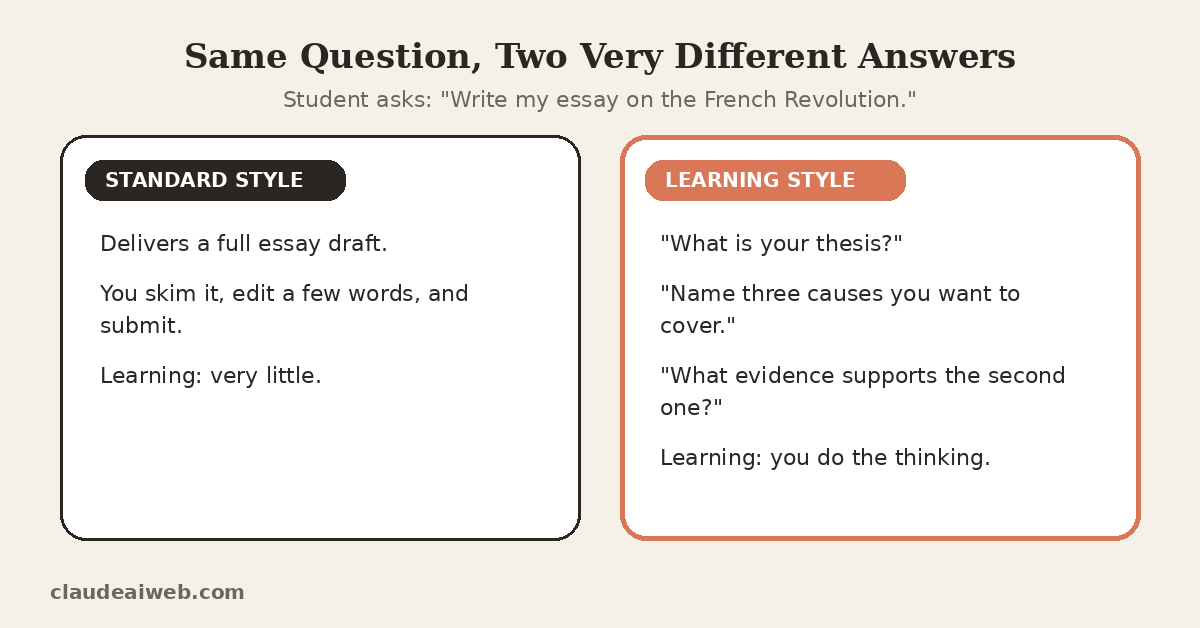
Think about entering the query “Write my essay about the French Revolution.” In the traditional style, you might get the complete essay. In the learning style, you will have to give your thesis statement first. Next, you need to tell which causes you want to discuss. That’s really frustrating. But that’s where learning happens.
For coding students, the same idea applies. Learning style acts like a pair programmer. It leaves #TODO comments and asks you to finish short code segments. If you code for class, read our comparison of Claude Code vs Claude Chat.
My second opinion: switch Learning style on for your weakest subject only. Use standard style for subjects you already understand. That mix saves time without hollowing out your brain.
Five Study Workflows That Work
The competitor guides contain primarily prompt templates. I prefer workflows. A workflow is a sequence of steps, so it will teach you something. Here are 5 I have great faith in.
1. The gap finder
To begin with, you need to write down everything that you can recall about today’s class without opening your notes. Once you do so, copy the information and put it in Claude. Claude will then highlight what you have forgotten.
This is because it is important to remember before helping. You test yourself initially.
2. The reverse explainer
Choose a challenging idea. Tell Claude about it, as a naive stranger. Then have Claude challenge you to an explanation. Weak spots appear quickly. You will see them first, before your exam does.
3. The reading triage
Long reading sucks up your week. Copy and quote a part of the chapter and explain what is the central idea of that. Afterwards, tell me what parts you had to read closely. Lastly, read those sections independently.
4. The exam postmortem
Once you have completed a quiz, paste over your incorrect answers. Have Claude tell you what your errors do have in common. For instance, you can confuse two similar words. Solving a pattern is better than a re-read.
5. The code debugger
Copy and paste your error message and your code. Do not ask Claude to solve the problem, just for an explanation of the cause. Then write the correct one and write fix yourself. It will stick in your mind longer!
| Workflow | Time needed | Skill it builds |
| Gap finder | 15 minutes | Recall |
| Reverse explainer | 20 minutes | Understanding |
| Reading triage | 10 minutes | Prioritizing |
| Exam postmortem | 15 minutes | Error analysis |
| Code debugger | 10 minutes | Problem solving |
Claude Works Best After You Try First
I use Claude daily for research summaries and code explanations. One habit changed my results more than any prompt trick. I attempt the task first, then bring Claude in.
Consider a dense research paper. If I ask for a summary first, I forget it within a day. If I write my own summary first, the outcome improves. Claude then corrects me and fills gaps. That conversation sticks.
Students can copy this directly. Try the problem. Write the rough answer. After that, ask Claude to critique it. You keep ownership of the thinking, and you still get fast feedback.
Where the Line Sits: Studying vs Cheating
Policies differ by school and by course. Read yours before you begin. That rule beats every tip in this article.
Still, I use a simple test. I call it the first-draft test. Ask yourself one question. Who wrote the first draft?
- If you wrote it, and Claude critiqued it, you’re studying.
- If Claude wrote it, and you polished it, you’re outsourcing.
My third opinion: the second case hurts you more than any penalty. You pay tuition to build skills. A polished AI draft builds none. You’ll feel the gap in your next exam, or your first job.
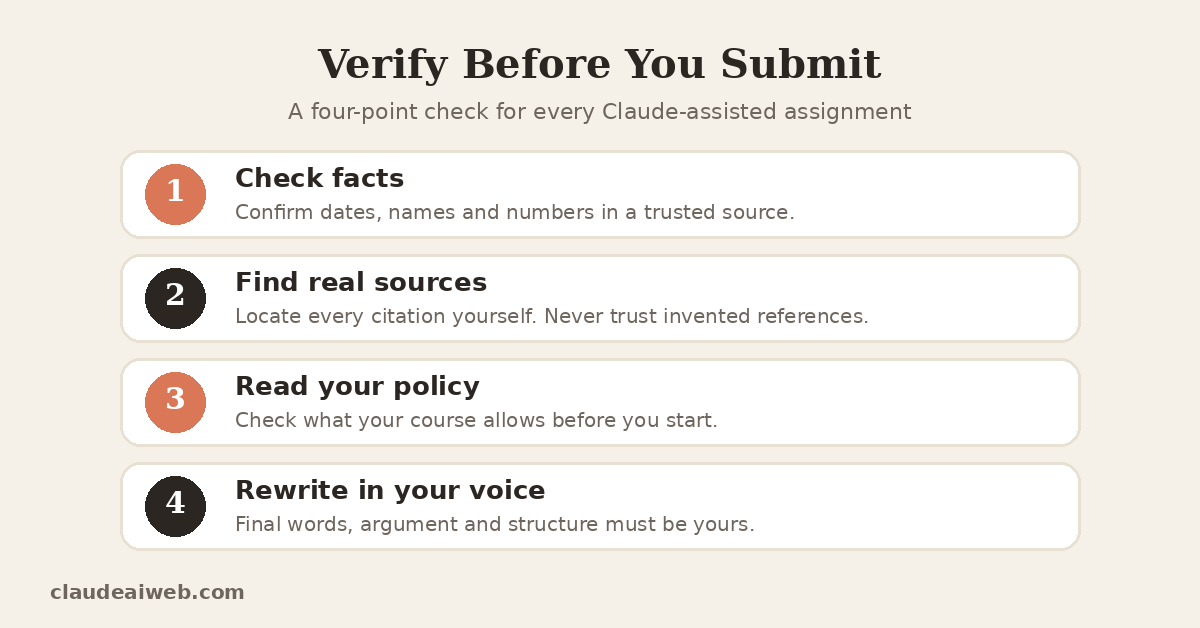
Use the checklist above before you submit anything. Then confirm what your instructor allows.
What Claude Gets Wrong for Students
I like Claude. However, students deserve all the facts.
- It can be self-assured and at the same time be incorrect. Claude might give an incorrect date or misread a formula. Neither way is a tone that gets it up. Hence, it’s important to check facts independently.
- It can’t be your citation source. Avoid copying a reference from Claude without searching it out. AI tools can be used to aid with invented sources. Your professor will detect it.
- Learning style is a soft barrier. Students can still change their style or log in with another account to receive direct answers. A feature to assist those wishing to learn. It will not prevent people who don’t.
- This free plan will expire quickly. Heavy users get constrained during exams periods. Also, the absence of student discounts is a huge boomerang when they are on promotions. For example, the OpenAI gave free months of ChatGPT Plus to eligible students in the USA.
Claude is not a picture creator. It reads pictures very well. However, it can’t create diagrams as image files. Other tools are required in the design classroom in addition to it.
But none of this bores Claude about studying. It doesn’t mean you lose control.
Privacy Rules Every Student Should Follow
Treat Claude like a public study group. Share only what you’d say out loud there.
- Skip classmate names, messages, and personal information.
- Do not upload institutional documents without prior permission.
- Never include passwords, IDs, and financial information.
- Don’t use Claude as a diary.
Also learn how to clean up. Our guide on how to delete Claude chat history walks you through it. If Claude lags during a deadline, check the Claude status page before you panic.
Student Programs Worth Knowing
Anthropic runs programs beyond the chat app. Two stand out.
Campus Ambassadors. Students collaborate with Anthropic on campaigns aimed at educating people on campus. This is ideal for students who enjoy event planning.
Student Builders. This program lets student builders apply for free API credits. The catch matters. Job or internship projects don’t qualify for funding.
Program details shift between cohorts. Check Anthropic’s site for open applications.
A One-Week Starter Plan
New to Claude? Follow this simple plan.
| Day | Task | Goal |
| Monday | Create a free account | Explore the interface |
| Tuesday | Turn on Learning style | Test it on a hard topic |
| Wednesday | Run the gap finder | Find lecture gaps |
| Thursday | Try the reverse explainer | Test real understanding |
| Friday | Review your limit hits | Decide on Pro |
| Weekend | Read your school’s AI policy | Set personal rules |
This plan costs nothing. It also builds habits before you need them.
Final Verdict
Claude for Students is effective as a tutor, but not as a ghostwriter. The free version can solve all problems. Pro is useful during rush hours. Campus may surpass both, hence, you should check with your institution.
Use Learning style for difficult topics. Do all assignments. Double-check each fact. Follow all your school regulations strictly.
Do that, and Claude sharpens your thinking. Skip it, and you only borrow answers. For more guides and updates, browse our AI News section.
Frequently Asked Questions
Does Claude offer a student discount?
No individual discount exists right now. Claude for Education is an institution-wide offer that a university must arrange. Check Anthropic’s pricing page for updates. costbench
Is Claude free for students?
Yes, the free plan works for light study. It has tight usage limits and skips some features. Heavy users may need Pro.
What is Learning style in Claude?
It’s a response style that guides your thinking. Claude asks questions instead of handing over answers. You can find it in the style dropdown menu.
Can I use Claude for homework?
It depends on your school’s policy. Explanations, quizzes, and feedback usually raise fewer concerns. Submitting AI-written work as your own often breaks the rules. Always check first.
How common is AI use among students?
Quite common. A 2024 Digital Education Council survey found that 54% of university students used generative AI weekly. Therefore, many schools now publish clear AI policies. TechCrunch
Can Claude give me citations for my paper?
Don’t rely on it. Find every source yourself, then read it. Claude can help you organize references, but you must confirm each one exists.