Can I Generate Code Using Generative AI? An Honest Developer’s Guide
The first time Claude generated a Python function that would have taken me twenty minutes to write myself, I stared at the screen for a moment wondering whether I should be impressed or worried. The code worked. It handled edge cases correctly. And it appeared in less than fifteen seconds.
This experience transformed my thoughts about coding. It is not what AI is capable of doing, but what it is like to the reality of how real developers, students, and small teams work.
It is now time to provide an honest response to the question posed: Yes, you can write code using the assistance of generative AI technology. But what does that mean in the real world, the limitations, the risks, the actual advantages? This is what this guide is actually about. Because the honest answer is far more interesting than a simple yes.
How Generative AI Actually Writes Code (My Perspective)
There is a common misconception worth clearing up first. Generative AI does not “think through” your problem the way a developer sitting across from you would. It does not reason about your system architecture or your business requirements. What it does is something different and genuinely impressive in its own right. It finds patterns in a vast amount of code. This covers documentation, tutorials, open-source repositories, bug patches, and forum discussions. Then, based on your prompt, it determines which code is most likely to be accurate and helpful.
This distinction matters enormously in practice. The model uses thousands of login system samples that it has seen when you ask Claude or GitHub Copilot to create a login system for you. Because the patterns underlying effective login code are well-established and widely represented in training data, the output frequently appears professional and structured immediately.
Where this breaks down is when your situation is unusual. proprietary data formats, extremely particular business rules, edge cases, or specialized frameworks that are underrepresented in training data. These are the exact places where AI-generated code begins to stray, make educated guesses, or confidently generate something marginally incorrect.
What differentiates developers who utilize AI successfully from those who are burned by it is an understanding of this.
The Real Productivity Gains (With Specifics)
Let me stop speaking in generalities for a moment, because the productivity argument for AI code generation is real, but it applies unevenly depending on what you are doing.
Boilerplate and Scaffolding: Where AI Genuinely Dominates
Setting up API routes, implementing CRUD operations, establishing middleware, bootstrapping a new component, and creating form validation are just a few examples of the code that takes up a significant amount of your time if you develop online apps. These tasks exhibit predictable trends. There is almost nothing novel happening. They just take time.
The most dramatic effect of AI code generation is here. A developer who spent an hour in the past configuring a REST endpoint with adequate error handling, input validation, and documentation can now have a good first draft in less than two minutes. That is no mere quality-of-life change; that is a radical change in the amount of ground that one developer can cover in a sprint.
Particularly, Claude is prone to creating scaffolding that is well-commented and explains itself in the process. To developers in a foreign framework or junior developers just developing their intuition, such an explanatory layer can be worth more than the code itself.
Debugging
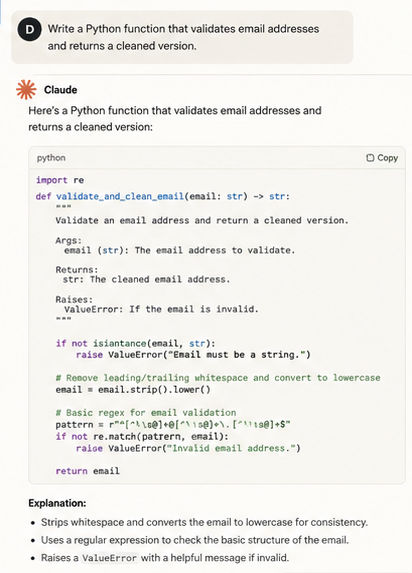
Artificial Intelligence is actually effective in debugging, but in a certain sense. It is good at syntax detection, common logic errors, and the detection of patterns of error that it has met previously. When you simply paste a stack trace and inquire about what has gone wrong, you usually have a helpful response within no time.
The thing that AI cannot do well is to solve issues that arise due to the interaction between your code and the rest of your system. A race condition bug in your particular database configuration, or an undocumented change of behavior in a third-party library version that you are utilizing. These require contextual understanding that goes well beyond what a language model working from a code snippet can provide.
The practical approach is to use AI as your first pass on debugging. It catches a large fraction of errors quickly. For the rest, you still need to think.
Learning
This is one of the things that are hardly ever discussed in terms of AI code generation: it can be one of the most effective learning tools ever developed by developers.
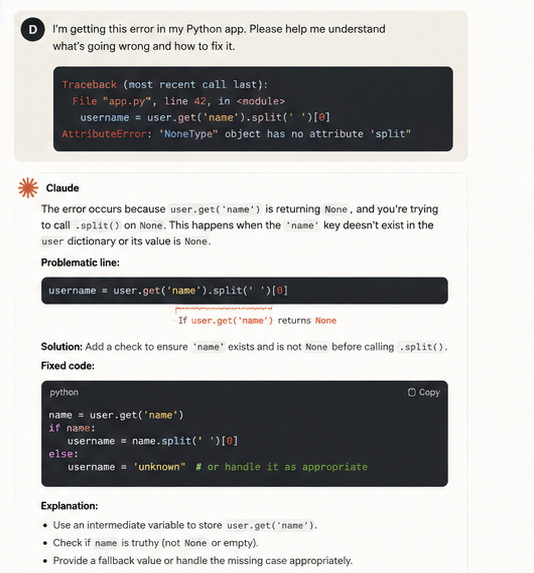
When you ask Claude to construct a function, you also ask it to explain the choices it made, such as why it selected a particular data structure, how it handled a particular edge situation, and how it organized its error handling. You receive explanations specific to your level and code. It is qualitatively different from reading documentation or watching a tutorial.
The danger, which it is not inappropriate to spell out, is that novices who replicate and execute AI code without reading it or understanding it learn nearly nothing. The same tool that can be used to speed up learning can also entirely circumvent it in the event you allow it. It is the practice of never reading anything without understanding why and never not knowing how to explain generated code in your own words that will turn you into a better developer or a faster copy-paster with AI.

What Claude Does Differently
As I am interested in Claude, I would like to be more specific about what makes it stand out in a coding situation.
The style of code generation adopted by Claude is much more inclined towards clarity and explainability rather than cleverness. Where other models may yield a solution that is highly optimized but obscure, Claude usually chooses code that can be read, comprehended, and edited without any trouble by a developer. This is the more practical default in most real-world applications, particularly when using teams or maintaining their own codebase.
In my testing, when I asked Claude to build a user authentication flow without specifying session management, it explicitly called out the assumption instead of silently implementing one. Other models often proceed without highlighting those assumptions.
One of the practical patterns that could be followed: consider Claude as a collaborator, not a generator, when it comes to code. Rather than writing a big prompt and hoping that a full solution exists, explain what you are aiming to achieve, provide some background information about your current codebase, and solve the problem bit by bit. The quality of one-shot prompting and iterative collaborative prompting is significantly different.
The Risks You Need to Take Seriously
No honest guide on this topic skips the limitations. Here are the ones that actually matter.
Security Is Your Responsibility, Not the Model’s
Artificial code may have security flaws. This is no fabrication; there have been reports and experiences with this issue in actual research and manufacturing processes. The typical weaknesses that exist are those that involve SQL injections on database queries, input validation issues, unsecured storage of sensitive variables, and outdated authentication procedures.
The practical guideline is simple. Prior to being implemented, any AI-generated code that deals with user data, payment processing, authentication, or authorization should be compared to current security best practices. Not skimmed, reviewed. When you are not able to read the code in a way that you can assess its security, that is an indication to either learn more about it and then use it or get someone to go through it on your behalf.
Hallucinated APIs and Outdated Methods
Language models occasionally refer to functions, methods, or libraries that are either nonexistent or existed in a prior library version but have since been deprecated or eliminated. This is particularly common with libraries that are constantly changing or frameworks that have undergone substantial version modifications.
These errors are identified before they become serious ones by making it a habit to check each library function against the most recent official documentation rather than simply running the code and assuming it works if it doesn’t crash.
The Overreliance Problem Is Real
If you often use AI code creation without maintaining your own skills, there is a subtle long-term danger that your problem-solving skills will deteriorate. Deep developer intuition is developed by experiences such as creating code from scratch, resolving challenging issues, making architectural choices, and managing the fallout. If AI takes care of everything, intuition ceases to grow.
Developers who utilize AI tools to expedite activities they already understand—rather than to avoid gaining comprehension in the first place—get the most out of them.
How to Prompt for Better Code (Practical Examples)
The quality of your prompt directly affects the quality of the code generated by AI. These are the particular patterns that regularly yield superior outcomes.
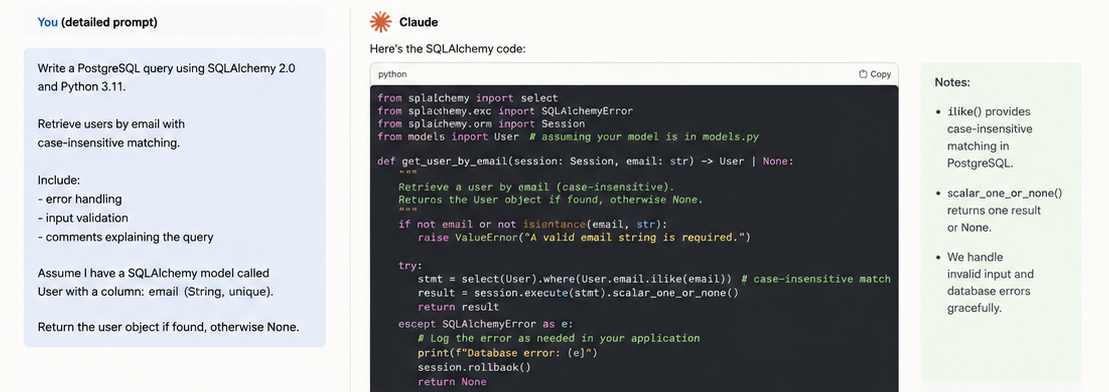
Be specific about your stack and version. Instead of “write a database query,” write “write a PostgreSQL query using SQLAlchemy 2.0 in Python 3.11 that retrieves users by email with case-insensitive matching.” Specificity narrows the solution space and eliminates guesses.
Example 1: Authentication System
Weak Prompt
Write a login system.
Typical Result
The AI will likely generate a basic authentication example but make assumptions about:
- Programming language
- Database choice
- Password hashing method
- Session management
- Error handling
- Security requirements
The output may work, but it often requires significant modification before it can be used in a real application.
Better Prompt
Create a FastAPI authentication endpoint using JWT tokens, bcrypt password hashing, and PostgreSQL.
Requirements:
- Python 3.11
- SQLAlchemy 2.0
- User registration and login endpoints
- Input validation
- Proper HTTP status codes
- Error handling
- Comments explaining important security decisions
Claude’s Output (Excerpt)
from fastapi import APIRouter, HTTPException
from passlib.context import CryptContext
from jose import jwt
pwd_context = CryptContext(
schemes=[“bcrypt”],
deprecated=”auto”
)
def hash_password(password: str):
return pwd_context.hash(password)
def verify_password(
plain_password,
hashed_password
):
return pwd_context.verify(
plain_password,
hashed_password
)
Because the prompt clearly defines the stack, security requirements, and framework, Claude can generate code that is much closer to production-ready.
Example 2: Database Query
Weak Prompt
Write a database query to find users.
Typical Result
The model has to guess:
- SQL or ORM?
- Which database?
- What defines a match?
- What should happen if no user exists?
The result is usually generic.
Better PrompT
Write a PostgreSQL query using SQLAlchemy 2.0 and Python 3.11.
Retrieve users by email using case-insensitive matching.
Include:
- Input validation
- Exception handling
- Comments explaining the query
- Return None if no user exists
Claude’s Output (Excerpt)
stmt = (
select(User)
.where(
User.email.ilike(email)
)
)
result = session.execute(stmt)
return result.scalar_one_or_none()
The improved prompt narrows the solution space and eliminates unnecessary assumptions, which typically leads to more accurate and maintainable code.
State what you do not want. If you want clean, readable code rather than a heavily optimized one-liner, say so. If you want error handling included, specify it. If you want the function to avoid global variables, mention it. Constraints produce better output.
Ask for explanations. “Write the function and explain why you structured the error handling this way” produces richer output than just asking for the function. It also gives you something to verify.
Use iterative refinement. If the first response is close but not right, do not throw it away and start over. Work with it: “This looks good, but I need it to also handle the case where the input is an empty list,” or “Can you refactor this to be more readable even if it’s slightly less efficient?” Iteration produces better results than repeated one-shot prompts.
What AI Code Generation Cannot Do
For all the legitimate excitement, here is a clear-eyed list of what these tools are not suited for:
Designing system architecture. Once a structure is chosen, AI can assist you in considering your alternatives and producing code, but you are ultimately responsible for choosing the structure of your system. Given your particular limits, human judgment informed by deep context is necessary to determine how data flows, how services communicate, and what the tradeoffs are between various techniques.
Understanding your users. No AI knows your users the way you do. Features that make sense for your specific audience and edge cases that matter in your particular domain. The reasoning behind specific product decisions are these come from a human context that no model has access to.
Taking responsibility. When an issue arises during production, a security flaw is found, or a design choice proves to be incorrect, a person must have sufficient knowledge of the system to identify and resolve the issue. That individual must be the owner of the code they ship, which entails having a thorough enough understanding of it to be held accountable.
A Practical Framework for Integrating AI Into Your Coding Workflow
If you are starting to integrate AI code generation into your work, or if you are already using it but want to use it more effectively. Here is a framework that works well in practice:
Maintain a clear grasp of the foundations. Make a conscious effort to solve problems without AI support on a regular basis. This is not because AI is flawed, but rather because your human problem-solving abilities are what enable you to assess and manage AI output efficiently.
First, define the issue for yourself. Write down in simple terms what the function must perform, what inputs it receives, what outputs it should generate, and what edge cases are important before launching a chat window. This disciplines your thinking and produces much better prompts.
Generate and read, never generate and paste. Before any generated code is added to your codebase, it should go through your eyes and comprehension. You’re not ready to utilize it if you can’t describe what it does.
Test independently. Write your tests before you generate the code, or write them immediately after with the explicit goal of breaking the generated solution. AI-generated code that passes your tests is code you can have some confidence in. AI-generated code you have not tested is a liability.

Final Thoughts
So, can I generate code using generative AI without losing control? Yes, and the experience feels simple, fast, and rewarding.
Generative AI has changed what it means to write code. The mechanics of typing out boilerplate, looking up syntax, and scaffolding repetitive structures. These have become dramatically faster and less tedious. That is a genuine improvement in the daily experience of software development.
The challenging aspects, such as comprehending the issue you are trying to solve, making wise architectural choices, creating dependable and safe software, and taking responsibility for the systems you create, have not changed. Those skills are still entirely yours.
The developers who get the most from AI code generation are not those who use it to avoid developing skills. They are the ones whose skills are strong enough to use it well. Claude and tools like it are most powerful in the hands of someone who can direct them, evaluate their output, and correct them when they are wrong.
Used that way, they are genuinely remarkable.
FAQs
Can a complete beginner use generative AI to learn programming?
Yes, and it can be an excellent learning tool, but only if you treat the generated code as a lesson, not an answer. Read every line, ask the model to explain its choices, and try to write variations yourself. Used this way, AI can accelerate learning significantly. Used as a copy-paste machine, it bypasses learning entirely.
Is AI-generated code safe to use in production applications?
It can be, but it must be examined in the same way as any other code, and occasionally even more thoroughly because it could contain patterns that seem correct but have subtle security issues. Any code that manages payments, authentication, or sensitive user data must be thoroughly reviewed by humans in compliance with current security standards prior to deployment.
Which generative AI tool is best for code generation?
The honest answer is that it depends on your workflow. GitHub Copilot integrates smoothly into most IDEs and works well for in-line completions while you code. Claude tends to produce more readable, well-explained code and handles complex reasoning tasks particularly well. The best approach for most developers is to try both and see which fits your working style. Many professional developers use more than one.
Does using AI for coding make you a worse programmer over time?
It can, if you use it in a way that bypasses skill development. It does not have to. Developers who use AI to move faster on tasks they understand, while still engaging directly with hard problems and maintaining their fundamentals, tend to grow as developers. The key is intentionality about how you use the tool.
What kinds of code should I not generate with AI?
Core security systems, cryptographic implementations, compliance-sensitive code, and anything involving confidential business logic should be written and reviewed by humans with the appropriate expertise. These are not areas where speed is the priority; correctness and security are, and the cost of getting them wrong is high.