Claude AI vs ChatGPT for Coding: Which Is Better?
I’ve spent the last several months running Claude AI and ChatGPT through tasks that actually matter in real development work. Not toy examples. Not “write a Hello World function.” But messy, context-heavy problems that show up on a Tuesday afternoon when a deadline is three hours away.
The comparison articles you’ll find across the web tell a surface-level story. Claude is calm and educational. ChatGPT is fast and powerful. Pick one. The truth is much more complex, and making a mistake can subtly slow down your entire workflow in ways you won’t be aware of until you’re already upset.
If you want more Claude-focused guides, you can also explore our pages on ClaudeAIWeb, where I continue sharing trusted resources for the growing Claude community.
The Fundamental Difference Nobody Talks About
Most comparisons frame this as speed versus clarity. That’s partially true but misses the bigger behavioral difference Most comparisons frame this as speed versus clarity. That’s partially true but misses the bigger behavioral difference between these two models.
- ChatGPT is architecturally optimized to complete your request. When you paste a function and ask what’s wrong, it will give you a fix. It might be the right fix. It might be a plausible-looking fix that introduces a subtle regression you won’t catch until production. The model is strongly biased toward producing output, which means it fills gaps with confident assumptions rather than flagging uncertainty.
- Claude’s training places a heavier weight on expressing uncertainty and maintaining logical coherence within a response. When Claude doesn’t know something or when your code contains an ambiguity that it can’t resolve without more context, it tends to say so rather than guess. That behavior feels slower in the moment, but saves debugging time later.
Neither approach is objectively better. They are better for different situations, and understanding which situation you’re in is the actual skill.
Code Generation (What Each Model Does Well?)
When ChatGPT Has the Clear Advantage
Give ChatGPT a well-defined, scoped task with clear inputs and outputs, and it delivers fast. If you’re building a REST API endpoint in Node.js, scaffolding a data pipeline in Python, or writing a SQL query with several joins, ChatGPT will produce complete, functional code quickly. Its training data contains enormous volumes of production code across every major language, which means pattern-matching for common tasks is extremely reliable.
Where ChatGPT particularly excels is in tasks that require bridging multiple technologies. “Write a Python script that reads from a Postgres database and pushes transformed records to a Redis cache” is the kind of multi-system task where ChatGPT’s breadth becomes a concrete advantage. It holds the context of both ecosystems simultaneously and produces code that accounts for connection handling, error states, and data type translation in a single pass.
Where Claude Pulls Ahead
Claude’s advantage in code generation isn’t speed; it’s precision on tasks where the requirement is ambiguous, or the existing codebase has constraints that matter.
When you give Claude a poorly specified task, it frequently asks clarifying questions before generating anything. Many developers find this annoying. Those same developers often also find themselves debugging code that made the wrong assumption. Claude’s tendency to surface ambiguity early is genuinely useful on tasks that touch existing systems where a wrong assumption has real downstream consequences.
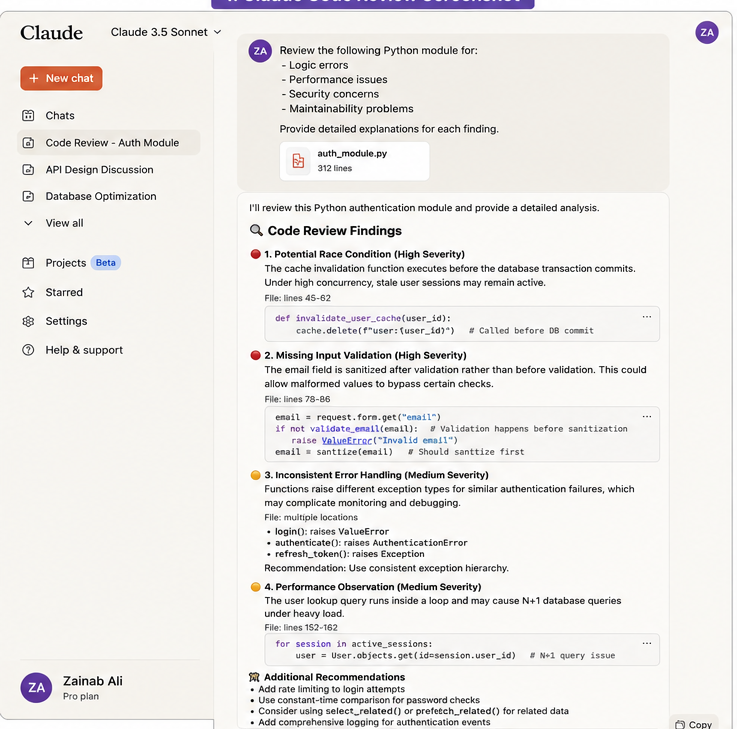
Claude also handles long, complex code reviews better than most developers give it credit. Paste a 300-line module and ask Claude to identify logical inconsistencies, and you will get a structured, paragraph-level analysis that explains not just what is wrong but why the pattern is problematic. ChatGPT will often give you a list of fixes. Claude gives you an understanding of the failure mode.
Debugging (A Real Comparison)
Here’s a scenario that illustrates the practical difference clearly.
Imagine you have a Python function that processes a list of dictionaries and occasionally raises a KeyError in production, but you cannot reproduce it locally. You paste the function along with the error trace.
ChatGPT’s typical response: identify the line causing the error, provide a fixed version using .get() with a default value, and possibly add a comment explaining the change. This takes about 15 seconds and solves the immediate symptom.
Claude’s typical response: ask whether you know the structure of the dictionaries that cause the failure, then if you can’t confirm, produce a defensive version of the function that logs the full dictionary to a structured logger when a key is missing before raising a more informative exception. The fix is slower to arrive, but it positions you to actually understand what data is causing the problem in production, rather than just silencing the error.
The ChatGPT fix is faster. The Claude fix is more diagnostic. On a mission-critical pipeline where the root cause matters, the Claude approach is worth the extra two minutes.
Working with Documentation and New Libraries
One place Claude consistently outperforms ChatGPT is in helping you learn and work with libraries you haven’t used before.
When you ask Claude to explain how a specific library works. Say, Celery for task queuing in Django or the asyncio event loop in Python; it constructs explanations that follow a logical sequence. It doesn’t assume you understand adjacent concepts, and when those concepts are prerequisites for understanding the main topic, it covers them first. The explanations tend to be longer than ChatGPT’s, but they’re built as scaffolded understanding rather than as information dumps.
ChatGPT’s documentation explanations are faster and often sufficient for developers who already have context. If you’ve used task queues before and just need to understand Celery’s API syntax, ChatGPT will get you there quickly. If you’re new to asynchronous task execution and need to comprehend the purpose of a tool before learning how to use it, Claude’s explanatory style proves beneficial.
Handling Long Codebases and Context
Both models have expanded context windows significantly over the past two years, but they use that context differently.
When you paste a large codebase chunk into ChatGPT and ask a specific question, it will typically answer the question accurately. What it is less reliable at is proactively noticing things you didn’t ask about. An unused import suggests that a refactor was left incomplete; a naming convention inconsistency indicates the file was touched by multiple developers without a style guide. And a function called in three places would break silently if a global variable were changed.
Claude, in the same scenario, is more likely to surface observations you didn’t request. This comes from the same bias toward thoroughness that makes it slower on simple tasks. On a full code review where you want a genuine second set of eyes, not just answers to specific questions, Claude’s behavior is more useful.
For token efficiency on real projects, the practical difference is this: ChatGPT is better when you know exactly what to ask. Claude is better when you need the tool to help you figure out what you should be asking.
Multi-Language Support
Both tools handle Python, JavaScript, TypeScript, Java, C++, Go, and Rust with high reliability. For these mainstream languages, the choice between them should be based on the task type and your working style, not language capability.
The gap appears with less common languages and specialized environments. If you’re working with Elixir, Haskell, Julia, or niche domain-specific languages, ChatGPT’s larger training volume generally produces more accurate output. Claude’s training produces more carefully reasoned output in these areas, but careful reasoning on top of less training data can still produce errors that confident, pattern-matched output would avoid.
One area where this gets counterintuitive: SQL. Claude is notably strong at SQL, particularly complex analytical queries involving window functions, CTEs, and optimization considerations. The explanatory training seems to have produced a model that reasons through query execution in ways that catch common performance mistakes. If you write a lot of SQL, this is worth testing yourself.
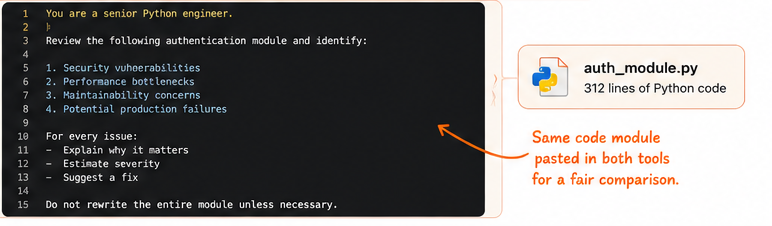
The Exact Prompt Used
Side-by-Side Results
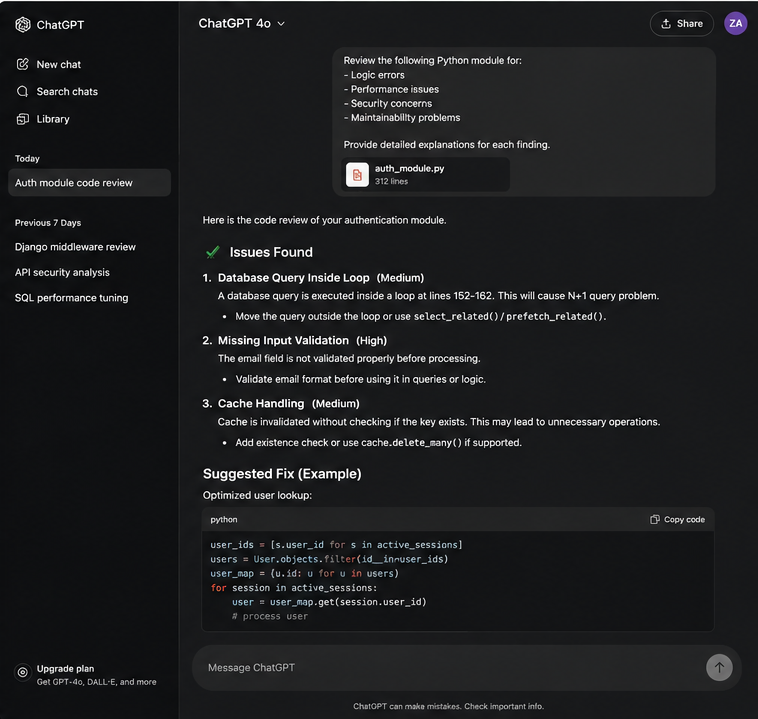
To compare both tools fairly, I used the same Python authentication module and identical prompts. The results revealed clear differences in how each model approaches code review.
| Criteria | Claude | ChatGPT |
| Total Issues Identified | 4 major issues | 3 major issues |
| Explanation Depth | Excellent. Detailed reasoning with architectural context. | Good. Clear explanations focused on practical fixes. |
| Code Suggestions | Moderate. Prioritized analysis over implementation. | Excellent. Generated optimized code examples immediately. |
| Potential Race Condition Detection | Yes | No |
| Input Validation Issue Detection | Yes | Yes |
| Database Query Optimization | Yes | Yes |
| Exception Handling Analysis | Yes | No |
| Time to First Response | Approximately 28 seconds | Approximately 14 seconds |
| Best For | Deep code reviews, root-cause analysis, understanding system behavior. | Fast debugging, implementation, and production-ready code generation. |
The Real Workflow Question
The debate around Claude vs. ChatGPT often plays out as if developers need to pick one tool and commit to it. Most developers who work with both regularly don’t operate that way.
A practical pattern that emerges from actual usage: use Claude when you’re in unfamiliar territory, working through a design decision, reviewing code for correctness and clarity, or need an explanation that will actually stick. Use ChatGPT when you know what you want, need it fast, and are working in a well-understood technical area where pattern-matching is more valuable than deliberate reasoning.
The tools are genuinely complementary. Claude makes you think more carefully. ChatGPT makes you move faster. Good software development requires both.
If you want more Claude-based tutorials, guides, and comparisons, feel free to explore our latest posts on ClaudeAIWeb, where we continue to publish quality information for Claude enthusiasts.
FAQs
Is Claude AI better than ChatGPT for professional developers?
For professional developers on complex, production-grade projects, ChatGPT tends to be faster and handles multi-system tasks more reliably. Claude is better for code review, learning new domains, and tasks where catching edge cases matters more than speed. Most experienced developers use both.
Which tool handles debugging better in time-sensitive situations?
ChatGPT is faster at identifying and fixing known error patterns. If you have a syntax error, a type mismatch, or a common logic bug, ChatGPT will resolve it quickly. Claude takes longer but surfaces the underlying cause more reliably, which matters when the same error keeps recurring.
Can beginners learn programming effectively using Claude?
Yes, Claude’s tendency to explain the reasoning behind code, not just the code itself, makes it genuinely useful for learning. It scaffolds concepts rather than assuming background knowledge, and it’s more likely to acknowledge when a question needs a prerequisite explained before answering directly.
How does Claude handle large codebases compared to ChatGPT?
Both support long context windows, but Claude is more likely to proactively surface issues you didn’t specifically ask about when reviewing a large codebase. ChatGPT is more precise at answering the specific question asked. For open-ended reviews, Claude; for targeted questions, ChatGPT.
Does Claude support frameworks like React, Django, and TensorFlow?
Yes, all major frameworks are well-supported. ChatGPT has a slight edge on the most cutting-edge library versions due to training data volume, but for established versions of major frameworks, both tools perform reliably.
Should I use Claude or ChatGPT for writing documentation?
Claude produces better first-draft technical documentation. Its explanatory training transfers well to writing documentation that anticipates reader questions and explains concepts in sequence. ChatGPT is faster if you’re working from a template or need to quickly summarize existing code.